










Your CA doesn't have to sit in your office anymore
When I started working around accounting processes, working with a CA usually meant working across the same desk.
The accounts team would prepare the books, keep the supporting documents ready and wait for the CA's visit. Questions were discussed face-to-face. If something needed correction, the accountant could make the change while the CA was there. If another document was required, someone could usually find it within a few minutes.
That way of working still exists, of course. But business operations have changed considerably.
Today, the business owner might be travelling, the accounts team could be working from another branch, and the CA might be sitting in a completely different city. For businesses with multiple locations, physical visits can become even less practical.
But the accounting work hasn't changed.
- The books still need to be maintained.
- Transactions still need to be reviewed.
- Queries still need to be answered.
- Adjustments still need to be passed.
- And eventually, the books have to be closed.
This is where remote accounting becomes useful.
In my experience, however, the biggest challenge isn't whether the technology is available. It is whether the people involved have a clear way of working together.
- Who enters the transactions?
- Who reviews them?
- Who can make changes?
- How does the CA raise a query?
- Who is responsible for resolving it?
- How do you make sure that everyone is looking at the same version of the books?
If these questions aren't answered, even the best technology can end up creating more confusion.
The first step is deciding who is responsible for what
Remote collaboration works much better when the roles of the business owner, accounts team and CA are understood from the beginning.
The business owner is generally interested in the overall financial position of the business—cash flow, receivables, payables, profitability and important approvals.
The accounts team deals with the day-to-day accounting work,
and the CA may review the books, advise on accounting and tax matters, identify adjustments and assist with financial statements or year-end closing.
The exact arrangement varies from business to business.
In a small business, the owner may also be handling some accounting activities. In another organisation, there may be an accounts executive, accounts manager and finance head, with the CA coming in primarily for review and compliance.
There is no single correct structure.
What matters is that everyone knows where their responsibility starts and where it ends.
I have seen situations where a CA identifies an accounting issue but assumes the accountant will correct it, while the accountant assumes the CA will pass the adjustment. A week later, the issue is still sitting there.
Remote working makes these gaps more visible.
So before thinking about technology, decide who is responsible for recording, reviewing, approving and correcting the books.
Sharing books is not the same as collaborating on books
This is probably one of the biggest changes businesses need to understand.
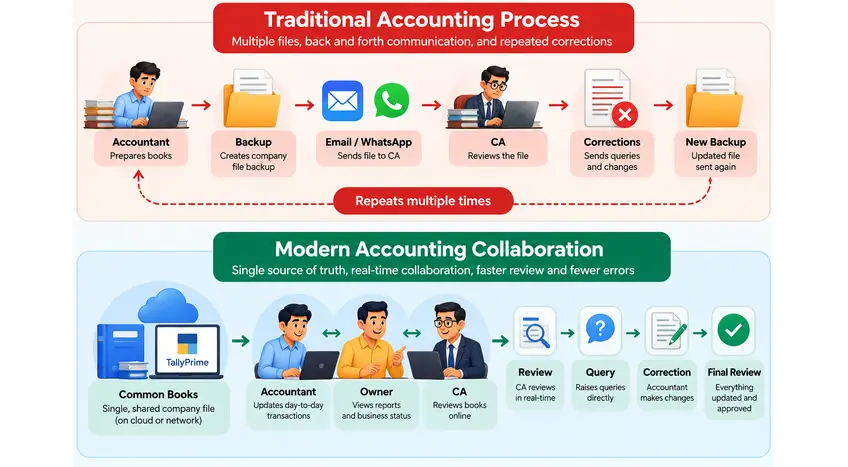
Sending a backup to your CA is certainly a way of sharing accounting data. But sharing a copy and collaborating on the books are two different things.
Consider a simple example.
The accountant sends the CA a backup on Monday.
On Tuesday, the accountant records new sales, purchases and receipts.
On Wednesday, the CA reviews the backup and identifies several transactions that need clarification.
Now the CA is looking at Monday's version while the accountant is working with Wednesday's version.
Neither person is necessarily doing anything wrong. The problem is simply that they are no longer looking at exactly the same data.
This is how file ping-pong begins.
The CA sends observations. The accountant makes changes. Another backup is sent. More observations are made. Eventually, people start asking which backup contains which correction.
For a business with a small number of transactions, this may be manageable. For a growing business, it can quickly become difficult.
Modern accounting software can reduce this dependency on repeatedly exchanging copies by allowing authorised users to access company data remotely. TallyPrime, for example, provides remote access to company data for authorised users, subject to the applicable configuration, licensing and connectivity. TallyPrime Remote Access documentation
But I wouldn't evaluate remote access simply by asking whether a software package has the feature.
The more important question is:
Can the people involved work with the right information while maintaining control over who can see and change it?
That is what makes remote collaboration useful.
Give people access according to their responsibility
Once multiple people are working remotely, user access becomes much more important.
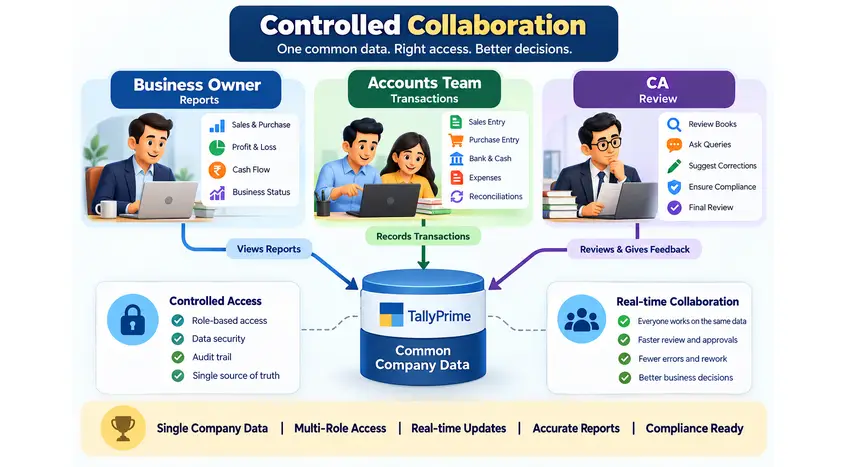
The owner may need to see the Profit & Loss, Balance Sheet, receivables, payables and cash position.
The accountant may need to create vouchers, reconcile transactions and maintain masters.
The CA may need to review transactions and perform or supervise specific accounting adjustments.
These are different responsibilities.
So remote access should not mean:
"Everyone can access everything."
It should mean:
"Everyone can access what they need to do their job."
TallyPrime provides security controls that allow businesses to create users and define access rights based on their roles. TallyPrime Security Controls
I consider this particularly important for businesses where several people are working with the same books.
When everyone is sitting in one office, you can often turn around and ask, "Who made this change?"
When people are working from different locations, proper user controls and accountability become much more important.
A simple principle works well:
Give users enough access to perform their responsibility, but avoid unnecessary access.
It is a small discipline that can make remote accounting much easier to control.
CA queries need a process, not another WhatsApp conversation
This is one area where technology alone doesn't solve the problem.
Let's say the CA finds a purchase transaction and asks:
"Why has this been booked under repairs and maintenance?"
The accountant responds on WhatsApp.
The CA asks for the invoice.
The invoice is sent by email.
The accountant calls the CA to confirm the correct ledger.
Someone eventually makes the correction.
Two weeks later, nobody is quite sure whether the CA's original query was actually resolved.
I have seen versions of this happen in many accounting environments.
The problem isn't that WhatsApp or email is being used. The problem is that the query doesn't have an owner, a status or a clear resolution.
A better approach is to treat such questions as open accounting items.
For example, the team might maintain a simple review list:
|
Accounting query |
Responsibility |
Status |
|
Purchase booked under incorrect ledger |
Accounts team |
Open |
|
GSTIN needs verification |
Accounts team |
In progress |
|
Supporting invoice required |
Business owner |
Pending |
|
Year-end adjustment |
CA |
Resolved |
This doesn't need to become a complicated project-management exercise.
The objective is simply to make sure that when the CA asks a question, everyone knows what the question is, who needs to answer it and whether it has been closed.
The objective is to reduce file ping-pong
There is a useful distinction between sharing accounting data and working together on accounting data.
In a traditional process, the accountant prepares the books, creates a backup, sends it to the CA, receives observations, makes corrections and sends another backup.
That process can work.
But as the number of transactions and people increases, maintaining multiple copies becomes increasingly difficult.
A connected workflow aims to reduce that movement.
The accountant continues maintaining the books. The CA can review the relevant information remotely. The owner can access the reports they need. Queries can be raised and resolved without repeatedly creating another version of the entire company data.
It doesn't mean everyone should be editing everything at the same time.
It means the process is designed around controlled access to accounting information, rather than continuous movement of files.
That is a much more sustainable approach as the business grows.
What really happens when several people work on the books at once?
This is a question business owners often ask when moving from a single-user accounting setup to a multi-user environment.
Imagine that one person is entering sales, another is recording receipts, the owner is checking reports and the CA is reviewing the books.
Can all of them work simultaneously?
The answer depends on the accounting software, licensing, configuration, connectivity and user permissions.
Modern accounting systems are designed to support multi-user working, but I would not stop the evaluation at the question:
"How many users can access the software?"
That number tells you only part of the story.
I would want to know what happens when two users access the same transaction, how user activity is identified, what permissions are available and how the system protects the integrity of the data.
TallyPrime supports multi-user working according to the applicable licensing and configuration. TallyPrime Multi-User information
The real test is what happens during an ordinary working day—not what happens during a software demonstration.
Remote access changes the location of the review, not the accounting discipline
There is sometimes a misconception that once the CA can access the books remotely, the review process itself becomes easier automatically.
It doesn't.
The accounting discipline remains the same.
A CA may still need to investigate unusual sales, review customer balances, examine purchase transactions, check GST treatment, review bank reconciliation or ask for supporting documents.
The difference is that the CA doesn't necessarily have to be physically sitting next to the accountant to do that work.
This distinction is important.
Remote accounting changes where people work. It should not change the quality of the accounting review.
If anything, remote working makes a structured review process more important.
Year-end closing is where remote collaboration is really tested
Anyone who has been involved in year-end closing knows that it is rarely one single task.
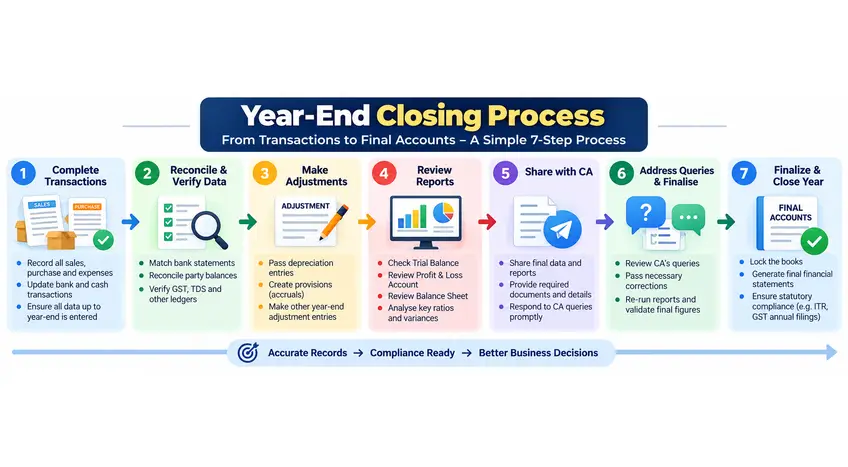
By the time the books are ready for final review, several things need to come together—bank reconciliation, receivables, payables, inventory, depreciation, outstanding expenses, provisions, GST reconciliation and various adjustment entries.
When the owner, accountant and CA are sitting together, many questions can be answered immediately.
When they are in different locations, a small unresolved issue can turn into an email, followed by a call, followed by another request for a document.
This is why I don't recommend treating year-end closing as something that starts at the end of the financial year.
A smooth year-end is usually the result of reasonably clean monthly accounting.
If bank reconciliation is regularly completed, old receivables and payables are reviewed, GST differences are investigated and supporting documents are available, the final closing becomes much more manageable.
The remote workflow can then be quite straightforward:
Reconciliation → Open items → Supporting documents → Adjustments → CA review → Final reports → Closing
Don't wait until March to discover October's problem
This is perhaps one of the most practical lessons I would include in the article.
When the CA starts the year-end review and finds an old transaction that needs clarification, the problem isn't necessarily the transaction itself.
The bigger problem is that everyone now has to remember what happened months earlier.
The invoice may be buried in an email.
The person who recorded the transaction may not remember it.
The supplier may take several days to respond.
And the CA's review schedule may already be tight.
Regular review changes this completely.
If the same transaction had been questioned when it was recorded, the supporting document and explanation would probably have been available immediately.
So remote collaboration should not mean:
"The CA will review everything remotely at year-end."
It should mean:
"The CA can review the books periodically without needing to be physically present."
That small difference can have a significant impact on the closing process.
Audit trails become more important when more people have access
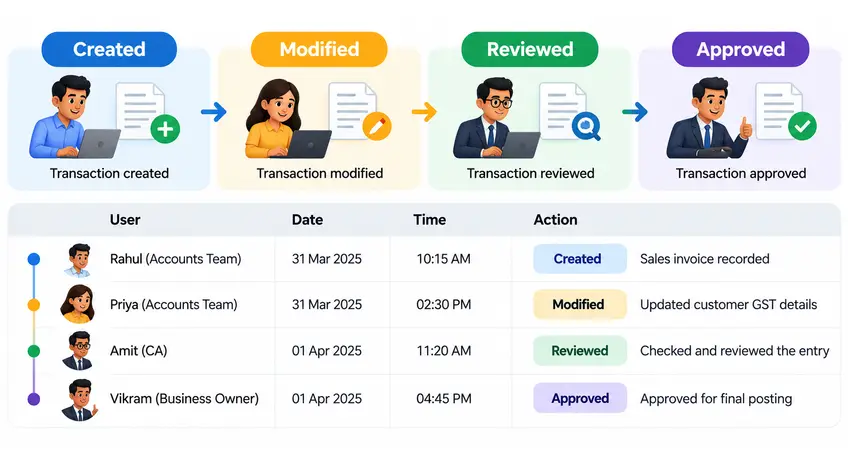
There is another aspect of remote accounting that deserves attention: knowing who changed what.
Suppose a ledger balance changes.
You may want to know who made the change, when it happened and what was changed.
That becomes especially important when several people have access to the same books.
TallyPrime's Edit Log provides tracking of changes made to transactions and masters, including information that helps identify modifications. The exact functionality and compliance applicability depend on the configuration and applicable requirements. TallyPrime Edit Log documentation
An audit trail is not just something that becomes relevant when an auditor arrives.
It is also a management control.
If the accountant knows that important changes are traceable, and the owner or CA can review those changes when necessary, accountability becomes part of the accounting process itself.
The real benefit isn't working from anywhere
"Access your accounts from anywhere" is a useful feature to talk about.
But I think it misses the bigger point.
After years of working around accounting processes, I see the real advantage of remote collaboration as reducing dependency on physical presence without losing financial control.
The owner doesn't have to wait for the next CA visit to see important reports.
The CA doesn't necessarily have to wait for a backup file to arrive.
The accountant doesn't need to keep several versions of the same books simply because different people are reviewing them.
Everyone can work according to their responsibility while referring to the same underlying information.
That is where remote accounting starts becoming genuinely useful.
A practical approach to working with your CA remotely
I wouldn't recommend making remote accounting unnecessarily complicated.
Start with the basics.
First, agree on responsibilities. Decide who records transactions, who reviews them, who approves important adjustments and who is responsible for resolving queries.
Second, establish appropriate access. The owner, accountant and CA don't necessarily need identical permissions.
Third, reduce unnecessary file exchange. If the accounting system provides a suitable remote collaboration mechanism, use it instead of repeatedly creating and sending copies.
Finally, make review a regular activity.
Don't wait until the last few weeks of the financial year to discover months of unresolved questions.
Technology can make the process easier, but discipline in the accounting process is what makes it work.
Final thoughts
Remote accounting is not really about replacing the CA's office visit with a video call.
It is about changing how the business owner, accounts team and CA work together.
The technology makes remote access possible. But the quality of the process still depends on clear responsibilities, appropriate access, regular review and good accounting discipline.
After 15+ years around accounting, one thing I have learned is that most year-end problems rarely start at year-end. They usually start much earlier—when a transaction isn't reviewed, a document isn't collected, a reconciliation is postponed or a query is left unresolved.
Remote collaboration can help address this, provided it is treated as a better way of working, rather than simply a way of accessing the books from another location.
The real question isn't:
"Can my CA access my books remotely?"
It is:
"Can my CA, accounts team and I review, correct and close the books efficiently—even when we are not sitting in the same office?"
That is the real test of a modern accounting workflow.
FAQs
1. Can a CA review accounting books remotely?
Yes. Depending on the accounting software and its configuration, an authorised CA can access business data remotely for review and other accounting-related activities without being physically present at the business location.
2. Is it safe to give a CA remote access to accounting data?
Remote access should be controlled through appropriate user permissions, authentication and security practices. The CA should have the access necessary for their responsibilities rather than unrestricted access to every activity.
3. Can multiple people work on accounting books at the same time?
Many modern accounting systems support multi-user working. However, the actual experience depends on the software, licensing, connectivity, permissions and how simultaneous access to transactions is handled.
4. How can businesses avoid repeatedly sending accounting backups to their CA?
A suitable remote-access or connected accounting setup can reduce the need to exchange multiple copies of the books. The appropriate approach depends on the software and the business's workflow.
5. How should CA queries be handled remotely?
Queries should ideally be connected to a specific transaction or accounting issue, assigned to someone responsible and tracked until they are resolved. This is more reliable than depending entirely on scattered messages, emails and phone calls.
6. How can businesses make year-end closing easier when teams work remotely?
The best approach is to make year-end closing a continuous process rather than a single event. Regular reconciliation, timely document collection and periodic review of accounting queries can significantly reduce the pressure at year-end.







