
Why do differences appear in GSTR-9?
GSTR-9 is the annual GST return that summarises the relevant GST transactions and information for a financial year. While preparing it, businesses may find differences between their books of accounts, GSTR-1, GSTR-3B, ITC records and the figures auto-populated on the GST Portal.
These differences can arise for several reasons:
- Sales invoices, debit notes or credit notes may have been missed or reported incorrectly.
- Taxable values or GST amounts in the books may not match the filed returns.
- Input Tax Credit (ITC) claimed in GSTR-3B may differ from the eligible credit reflected in GSTR-2B.
- Reverse Charge Mechanism (RCM) liability may not have been recorded or paid correctly.
- Transactions relating to the previous financial year may have been reported in a later period.
- HSN/SAC details or other annual return information may require correction.
However, a mismatch does not automatically mean that tax is payable. For example, a difference may arise because of a reporting error, a timing difference or an incorrect classification. The reason should be checked before making any payment.
How can TallyPrime help prepare GSTR-9?
TallyPrime provides an improved way to prepare GSTR-9 by exporting data from the GST Annual Computation report in the GSTR-9 format. The report brings together annual GST information recorded in your books. You can review the figures for the financial year and export either the HSN/SAC Summary or all sections supported by the export facility. This helps you compare your accounting records with the GSTR-9 data auto-populated on the GST Portal and reduces the need for manual data entry.
How to export GSTR-9 data from TallyPrime 7.2
Step 1: Review your annual GST data
Open TallyPrime and press Alt+G (Go To). Search for GST Annual Computation and open the report. Select the relevant financial year and review the annual figures. Resolve outstanding GST exceptions and ensure that the applicable GSTR-1 and GSTR-3B returns have been filed.
Step 2: Export the GSTR-9 data
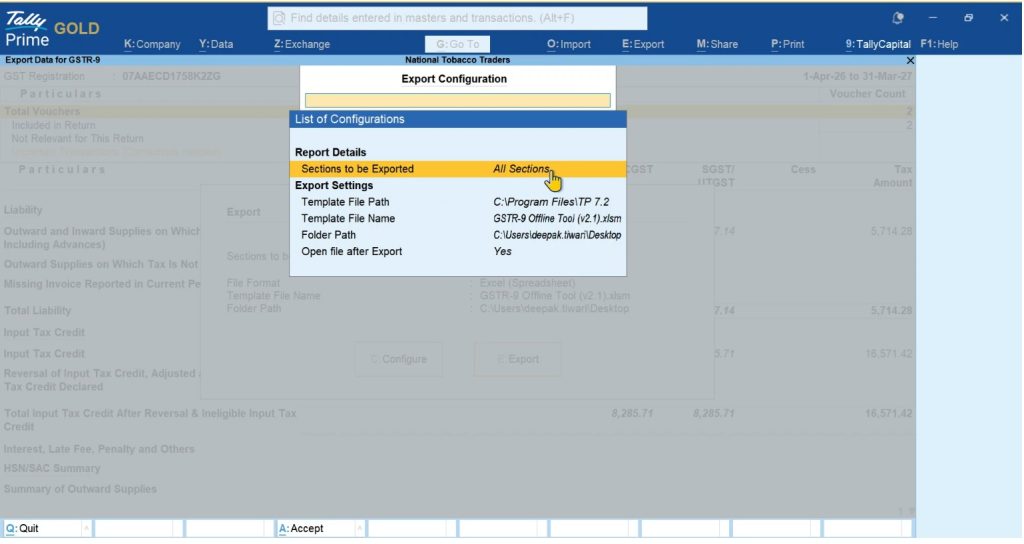
In the GST Annual Computation report, press Alt+E (Export) and select Data for GSTR-9. Choose whether you want to export all sections or only the HSN/SAC Summary. Configure the GSTR-9 Offline Tool template file and the export folder, then continue with the export.
Step 3: Compare the data with the GST Portal
Download the auto-populated GSTR-9 JSON file from the GST Portal. Open a separate copy of the GSTR-9 Offline Tool and import the portal JSON into that copy. Compare the portal data with the file exported from TallyPrime. If you find differences, investigate them and update the relevant figures in the portal-data copy of the Offline Tool, as applicable.
Important: Do not import the GST Portal JSON into the GSTR-9 utility file exported from TallyPrime, because this can replace the existing books data in that file. Also, exporting the data does not itself file GSTR-9 or automatically correct discrepancies.
What should you do when you find a difference?
Once the comparison is complete, identify the reason for each significant difference. Do not pay additional tax simply because two figures do not match.Start by checking the underlying invoices, credit notes, debit notes, tax rates, GST ledgers, ITC records and filed returns. Where the accounting entry is incorrect, correct the relevant voucher in TallyPrime and review the annual figures again.
If the difference relates to a return already filed, consider the applicable GST provisions and correction procedure. GSTR-9 is an annual return; it should not be treated as a substitute for correcting an earlier return where a separate correction mechanism is required. After reconciliation, determine whether the difference represents:
- A reporting or classification issue with no additional tax payable.
- A difference that requires correction of accounting records.
- An additional tax liability, possibly with interest.
- An ITC issue that requires reversal or another action under the applicable GST provisions.
Only after confirming the nature and amount of the liability should you proceed with payment, where required.
Also read GSTR-9 Reconciliation Guide: How to Match Your Books with Auto-Populated Data
What is form GST DRC-03?
Form GST DRC-03 is used for specified voluntary payments and other payments permitted under GST procedures. It may be used to pay additional tax liability identified during annual return preparation, along with applicable interest where required.
For example, a business may discover that a taxable outward supply was omitted from its earlier GST reporting and that the related tax was not paid. After checking the records and calculating the correct liability and applicable interest, the business may need to make the payment through DRC-03.
The form is not a general solution for every GSTR-9 mismatch. It does not revise an already-filed GSTR-9, and it does not automatically correct the underlying accounting or return data.
How can you pay additional liability through DRC-03?
The exact options available on the GST Portal may depend on the reason for payment and the applicable procedure. A typical voluntary-payment process involves the following steps:
Step 1: Log in to the GST Portal
Open the GST Portal and sign in using your credentials.
Step 2: Open the DRC-03 application
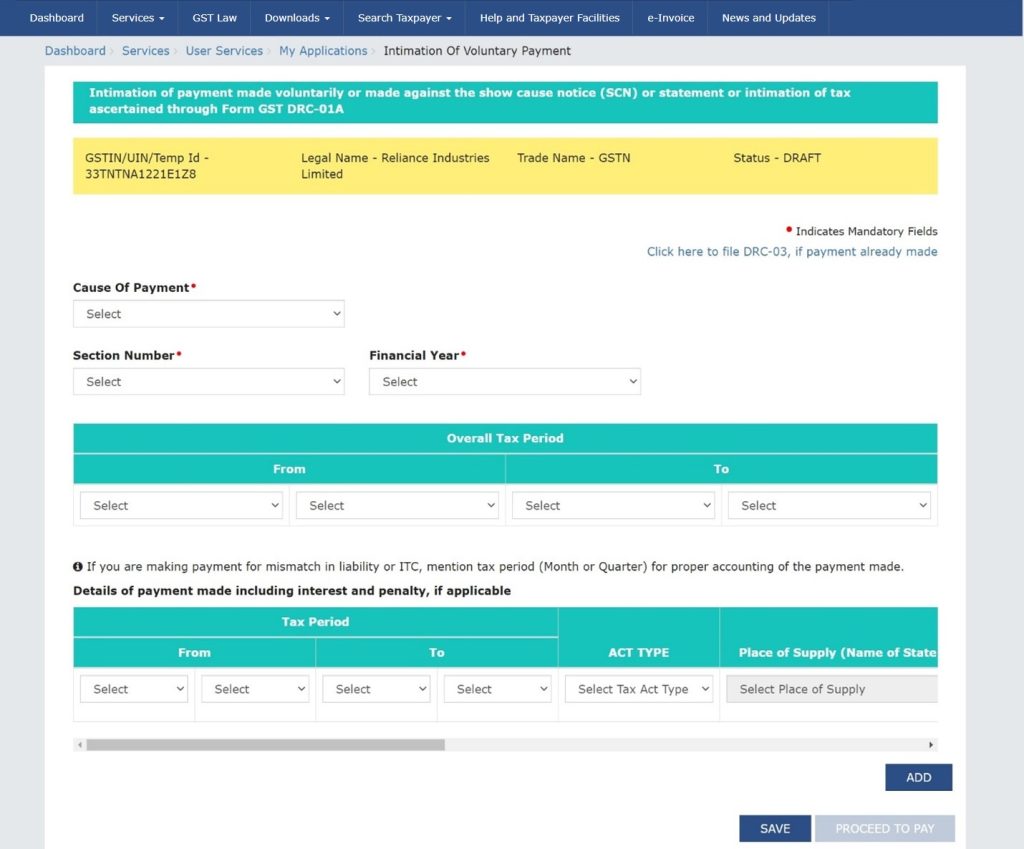
Navigate to the applicable DRC-03 option under the GST Portal's services or return-related menus. Where the portal provides a relevant payment option directly from a liability-comparison report, you may use that route.
Step 3: Select the applicable reason
Choose the appropriate application type or reason for payment. Ensure that the selected option accurately represents the circumstances of the payment.
Step 4: Enter the liability details
Enter the applicable tax amounts under the correct tax heads, such as IGST, CGST, SGST/UTGST and cess, as relevant. Include interest or other amounts wherever applicable and supported by the selected procedure.
Step 5: Make the payment
Check the available payment and ledger options carefully. Interest, penalty, late fee and other amounts subject to the cash-ledger requirement must be paid through the Electronic Cash Ledger. Follow the applicable rules for the tax component as well; do not assume that every amount can be paid using ITC.
Step 6: Submit and retain the acknowledgement
Review the details before submission and complete the applicable payment and filing steps. Save the acknowledgement and payment records with your GST reconciliation documents.
Because GST Portal screens and procedures can change, verify the currently available options before submitting DRC-03.
Can you pay every GST liability using input tax credit?
No. The permitted payment method depends on the nature of the liability and the applicable GST rules.
Eligible ITC in the Electronic Credit Ledger can be used to discharge permitted output tax liabilities, subject to the prescribed utilisation rules. However, liabilities such as tax payable under the Reverse Charge Mechanism, interest, penalty and late fee are generally required to be paid through the Electronic Cash Ledger.
For this reason, do not assume that the balance available in your ITC ledger can be used to pay every amount shown while preparing GSTR-9 or DRC-03. Confirm the nature of each liability and the payment options permitted under the applicable rules.
What should you check before filing GSTR-9?
Before filing the annual return, complete a reconciliation of the main GST records for the financial year.
- Confirm that the applicable GSTR-1 and GSTR-3B returns have been filed.
- Compare sales, taxable values and output tax with the books and filed returns.
- Review ITC claimed in GSTR-3B against the relevant GSTR-2A/2B information and eligibility requirements.
- Check RCM liabilities and related payments.
- Review credit notes, debit notes, amendments and transactions reported in later periods.
- Verify HSN/SAC summaries and other required annual return details.
- Investigate differences before deciding whether any additional payment is necessary.
- Retain the reconciliation workings, supporting documents and DRC-03 acknowledgement, where applicable.
Conclusion
Preparing GSTR-9 is easier when the books of accounts and GST returns are reviewed throughout the year instead of waiting until the annual return is due. Differences should be investigated before deciding whether additional tax is payable.
TallyPrime helps streamline this work by allowing businesses to export GSTR-9 data from the GST Annual Computation report, including the HSN/SAC Summary or all supported sections. This data can then be compared with the figures auto-populated on the GST Portal.
If the reconciliation confirms an additional liability, DRC-03 may be used where applicable to make the required payment. The important point is to identify the correct liability, calculate any applicable interest, follow the permitted payment method and maintain proper supporting records before completing the annual return.
Frequently asked questions
What is the purpose of DRC-03?
DRC-03 is used for specified voluntary payments and other payments permitted under GST procedures. It may be used to pay an additional liability identified during GSTR-9 preparation, where applicable.
What is new in TallyPrime for GSTR-9?
TallyPrime 7.2 allows you to export the HSN/SAC Summary or all supported sections from the GST Annual Computation report in the GSTR-9 format. You can compare the exported data with the information auto-populated on the GST Portal.
Does TallyPrime file GSTR-9 directly?
The export facility helps prepare and reconcile GSTR-9 data. You must review the information, use the prescribed Offline Tool or portal process as applicable, and complete filing on the GST Portal.
Can additional GST and interest both be paid through DRC-03?
DRC-03 may be used for applicable tax and interest payments. The amount, reason and permitted payment method must be checked according to the circumstances and the current GST procedure.
Can ITC be used to pay interest or RCM liability?
Generally, no. Interest and RCM liabilities are subject to the Electronic Cash Ledger payment requirement. Eligible ITC may be used only for permitted output tax liabilities, subject to GST utilisation rules.
Can GSTR-9 be revised after filing?
GSTR-9 generally cannot be revised once filed. If an error or unpaid liability is discovered later, the appropriate action depends on the nature of the error and the applicable GST provisions. DRC-03 payment does not itself revise the filed annual return.