Introduction: The accounting software dilemma
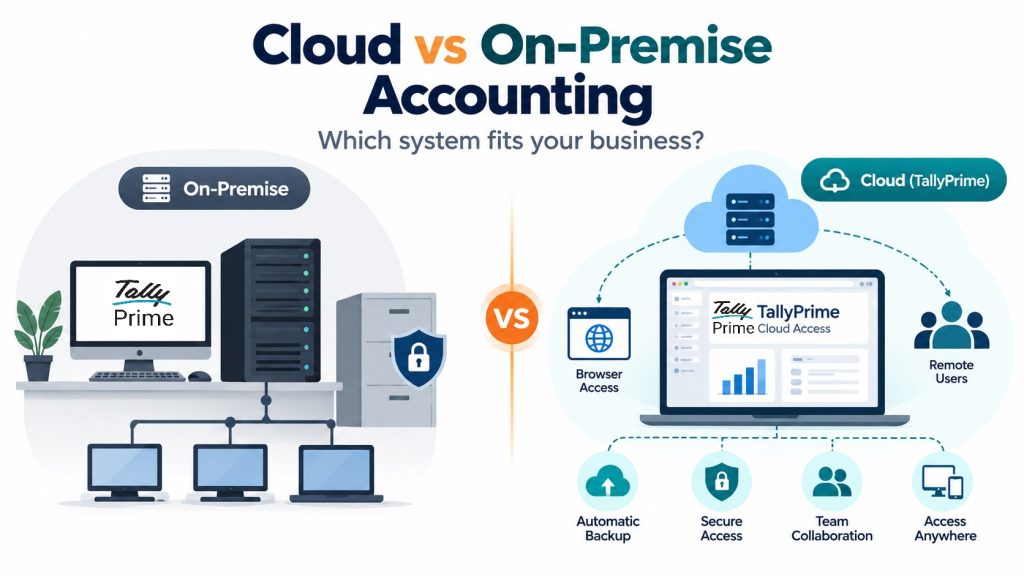
In my 20 years of accounting experience across manufacturing, pharmacy, retail, construction, automobile dealerships, e-commerce, and service industries, I have seen businesses face a common question: Should we continue using accounting software on our office computers or move to the cloud?
Earlier, this decision was largely about where accounting data should be stored. Today, businesses also need to consider remote working, branch-wise operations, data security, automatic backups, and the ability to access financial reports whenever required.
For example, a retail shop operating from one location may be comfortable using TallyPrime on a local computer. However, a growing business with branches in multiple cities may need accountants and managers to access the same accounting data without exchanging backup files or maintaining separate records. Cloud accounting can simplify these requirements, but it does not automatically mean that every business should abandon its existing local setup.
The right decision depends on the company's daily accounting activities, internet availability, security requirements, and budget. This article compares both approaches and explains how TallyPrime Cloud Access gives Indian businesses a practical option for managing accounting operations remotely without learning a completely different accounting system.
What are cloud-based and on-premise accounting systems in simple terms?
What is on-premise accounting software?
On-premise accounting software is installed on computers or servers located within the business premises. The company generally stores its accounting data on a local computer or office server. For example, a business using TallyPrime on a Windows computer can maintain its ledgers, record sales and purchases, manage inventory, and generate financial reports directly from the office.
The biggest advantage is that most core accounting activities can continue without an internet connection. However, the business is responsible for maintaining the computers, protecting its data, managing user access, and ensuring regular backups. For businesses with stable office-based operations, this remains a reliable and practical approach.
What is cloud-based accounting software?
Cloud accounting allows businesses to access accounting software and data through internet-connected servers instead of depending entirely on computers located in their offices. Authorized users can work from different locations, depending on the software and available access methods. For example, a business owner travelling outside the city can review accounts, while employees at the head office and branches continue recording transactions in the same centrally hosted accounting environment.
Cloud providers generally manage the underlying server infrastructure, reducing the need for businesses to maintain their own physical servers. However, users still need reliable internet connectivity, appropriate access controls, and a clear understanding of backup and data recovery arrangements.
The physical vs. digital vault analogy
Think of on-premise accounting as keeping your financial records in a secure office cabinet. You control the cabinet, decide who can access it, and take responsibility for protecting the records.
Cloud accounting is similar to keeping those records in a professionally managed digital facility. Authorized users can access them remotely, while the service provider manages much of the underlying infrastructure.
Both approaches can be secure and efficient. The main difference is how the accounting environment is managed and accessed.
How do cloud and on-premise accounting compare across core business factors?
Businesses should evaluate these five important factors before selecting an accounting setup.
- Work model & workforce mobility: On-premise accounting is suitable for employees working from a common office or local network. Cloud accounting is particularly useful when accountants, managers, and branch employees need access from different locations.
- Internet dependency & operational continuity: Locally installed accounting software can continue handling most routine activities without an internet connection. Cloud accounting requires internet connectivity to access the hosted system. However, on-premise operations also depend on local computers, electricity, and office network availability.
- Data access, latency & processing speed: On-premise performance depends mainly on the computer, local server, and network configuration. Cloud performance depends on internet quality, cloud resources, and the selected application. Modern cloud environments can provide responsive accounting performance, particularly when properly configured for the number of users and transaction volume.
- Control, data governance & security: On-premise accounting gives businesses direct responsibility for local data protection. Cloud solutions provide managed infrastructure and may offer additional security features such as multi-factor authentication, centralized user management, and automatic backups. Businesses must still maintain appropriate permissions and review data security policies.
- Cost structures: On-premise systems may require expenditure on software, local servers, UPS systems, maintenance, and IT support. Cloud accounting usually involves recurring subscription charges, with costs depending on users, resources, and services. Businesses should compare total costs rather than looking only at the initial investment.
|
Operational Factor |
On-Premise Accounting |
Cloud-Based Accounting |
|
Workplace Access |
Mainly through local office computers or networks. |
Remote access from supported devices and locations. |
|
Internet Requirement |
Most routine accounting works offline. |
Internet connection required for hosted access. |
|
Transaction Speed & Latency |
Depends on local hardware and network. |
Depends on cloud resources and internet connectivity. |
|
Data Custody & Security |
Business manages local data, security, and backups. |
Provider manages cloud infrastructure; business controls authorized access. |
|
Financial Cost Model |
Software, hardware, maintenance, and IT expenses. |
Subscription-based hosting and associated software expenses. |
Which businesses prefer on-premise vs. cloud setups? (Real-world examples)
Different industries have different operational requirements. The following examples illustrate where each approach may be more suitable.
On-premise preference examples
- Rural manufacturing plant: A manufacturing unit located in an area with unreliable internet may prefer on-premise accounting for its daily production and inventory records. TallyPrime can handle material receipts, manufacturing entries, stock movements, and billing locally. Online statutory services will still require internet access.
- High-volume POS retail superstore: A busy retail store may prefer a locally installed system for billing counters, especially when internet connectivity is inconsistent. Local processing can reduce dependence on external connectivity during customer checkout.
- Remote construction site projects: Construction sites often operate in locations with limited internet availability. A local accounting setup can help site accountants record expenses, material consumption, and equipment-related transactions. Where separate site data is maintained, proper consolidation or synchronization procedures are needed.
- Strictly regulated / defense sector: Organizations with specific data-location or infrastructure requirements may prefer a controlled on-premise setup. However, the decision should follow the organization's actual security policies and applicable regulations rather than assuming that cloud hosting is unsuitable.
Cloud-based preference examples
- Multi-branch logistics provider: A logistics company operating across several cities may need its branches to record transactions in one centrally hosted accounting system. Cloud accounting makes it easier for management to review financial information without waiting for separate data transfers.
- External CA & audit-intensive firms: Businesses working with Chartered Accountants or external finance professionals can provide authorized access to a centrally hosted accounting environment. This reduces repeated backup sharing and allows accounting records to be reviewed remotely.
- Fast-growing E-commerce brand: E-commerce businesses managing different warehouses, sales channels, and accounting teams may benefit from centralized data access. With a suitable cloud setup, employees can record transactions while management reviews sales, receivables, and financial reports from other locations.
For businesses that already use TallyPrime, TallyPrime Cloud Access offers a way to support these remote working requirements without replacing the accounting application.
Why is there no single "best" approach for every small business?
Not every business needs the same accounting infrastructure.
- Operational environments differ: A small shop with one accountant and reliable local computers may not require a cloud subscription. However, a business with multiple branches, travelling owners, and remote employees may benefit significantly from cloud access.
- Financial capital availability: Businesses should compare the cost of maintaining local computers and servers with cloud subscription charges. For a growing organization, reducing server maintenance and IT responsibilities can be valuable. However, a single-location business with an existing setup may find local accounting more economical.
- Customization & process complexity: Businesses using specialized TDL customizations, barcode systems, external applications, or automated data integrations should verify compatibility before moving to the cloud.
For example, TallyPrime Cloud Access supports compatible TDL and TCP customizations. However, external Windows applications, DLL-based add-ons, and other integrations may require a different setup or additional testing. The right approach should support current business processes without creating unnecessary difficulties.
How does TallyPrime offer the best of both worlds with hybrid flexibility?
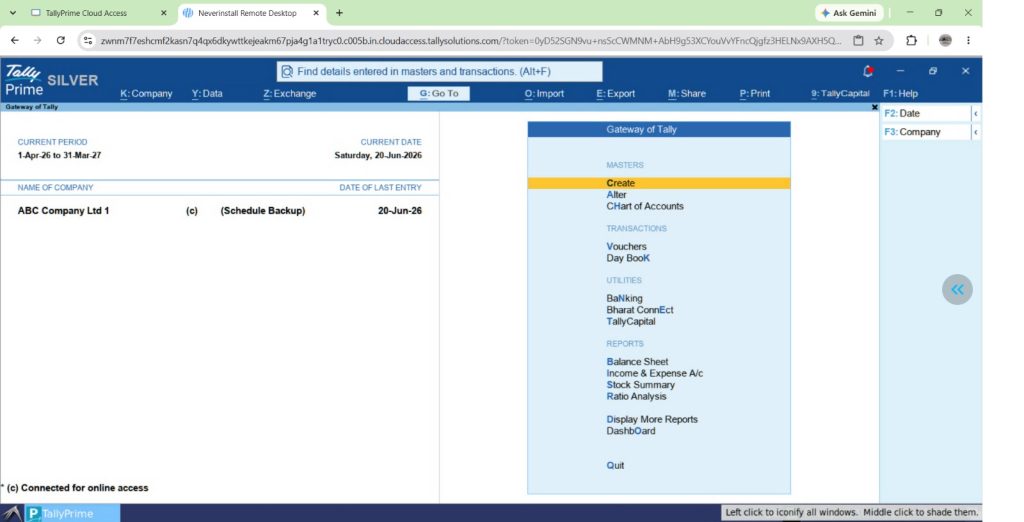
TallyPrime combines familiar desktop accounting features with remote access options, allowing businesses to choose how and where they work. Businesses can continue using TallyPrime locally or move their accounting environment to TallyPrime Cloud Access when centralized remote working becomes more important.
Desktop-first engine
TallyPrime is designed for efficient accounting and inventory management on Windows computers. It supports sales, purchases, payments, receipts, inventory, manufacturing transactions, GST compliance, payroll, and financial reporting. The application also provides convenient keyboard shortcuts for faster work, such as Ctrl+A to save transactions, Alt+G to access Go To, and Alt+C to create masters during voucher entry.
For businesses using TallyPrime locally, most routine accounting activities work without internet connectivity. Features such as e-invoicing, online GST services, Connected Banking, and cloud-based services require internet access. TallyPrime also supports features such as automated bank reconciliation, connected services, and scheduled data backups, depending on the release and configuration. These capabilities allow businesses to maintain efficient accounting workflows while adding connected services as required.
TallyPrime cloud access: Work from anywhere
TallyPrime Cloud Access (TPCA) is Tally's managed cloud solution for businesses that want to use TallyPrime remotely.
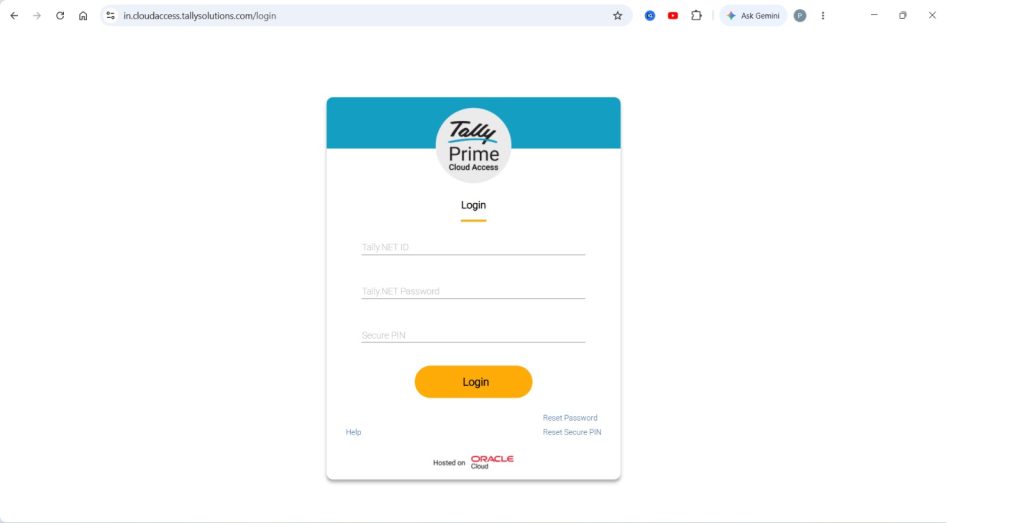
It allows the TallyPrime application and company data to run in a centrally hosted cloud environment. Employees can access the hosted system through a supported web browser or the TallyPrime Cloud Access client. The service is hosted on Oracle Cloud Infrastructure (OCI) and provides cloud infrastructure designed for remote accounting operations.
Key features of TallyPrime cloud access
- Remote access: Authorized employees can access TallyPrime from the office, home, or another location using supported desktop or laptop devices.
- Centralized company data: Businesses can maintain accounting data in a common hosted environment rather than exchanging separate company data files between branches.
- Multi-user collaboration: Multiple authorized users can work on the same company data, depending on the purchased plan and TallyPrime license.
- Familiar TallyPrime experience: Accountants continue using the familiar voucher entry screens, accounting reports, inventory features, and keyboard shortcuts.
- Reduced server maintenance: Businesses do not need to maintain a separate on-premise server for the centrally hosted accounting environment.
- Flexible access methods: Users can connect through a supported browser or cloud access client, depending on their device and workflow requirements.
For example, a company with its accounts team in Delhi and branch offices in Jaipur and Lucknow can use one centrally hosted TallyPrime environment. Authorized employees can record transactions while management reviews updated financial information.
This reduces the need to exchange accounting backups or manually combine data from separate locations. Cloud Access is particularly useful for businesses that want to continue using TallyPrime while improving collaboration between offices.
Administrative controls and security framework
Security is an important consideration when accounting data is accessed remotely. TallyPrime Cloud Access includes several controls that help businesses manage their users, data, and cloud environment.
- Dual-layer authentication: Cloud access uses Tally.NET credentials and a Secure PIN to help prevent unauthorized access.
- Self-service portal (SSP): Administrators can manage users, access settings, backups, and supported virtual computer operations through a centralized management portal.
- Granular data security permissions: The cloud environment supports selective data-sharing permissions such as Allowed, Disallowed, and Allowed in TallyPrime. These help control how users access shared data folders.
- Automated cloud backups: The service automatically backs up the virtual computer when it starts for the first time each day. Administrators can also create manual backups and download password-protected backup files.
- Backup restoration: Authorized users can restore data from available backups when required, subject to the service's backup and recovery procedures.
These features reduce some of the responsibilities involved in maintaining local accounting servers. However, businesses should still review user permissions, maintain suitable backup retention policies, and verify that important accounting data can be recovered when needed.
Practical operational benefit
Consider a growing Indian automobile dealership with a head office and multiple showrooms. The accounts department records supplier invoices, customer receipts, payments, inventory-related transactions, and other accounting entries in TallyPrime.
With a traditional local setup, remote branches may require separate data-sharing arrangements or centralized office network access. Using TallyPrime Cloud Access, the business can maintain its company data in one hosted environment and provide authorized users with access from different locations.
For example:
- Accounts team: Records daily purchase, payment, receipt, and journal vouchers.
- Branch employees: Enter permitted transactions according to their assigned security permissions.
- Management: Reviews financial reports, customer outstanding balances, and branch-related information without requesting separate backup files.
- External accountant: Accesses relevant records remotely when authorized.
This arrangement improves coordination and reduces the need for repeated manual data transfers. However, where a business already maintains its data locally, moving to Cloud Access requires a planned migration. The local data and hosted data should not be treated as automatically synchronized copies unless an appropriate synchronization arrangement has been configured. Businesses should also review their existing customizations, integrations, user requirements, and printing workflows before migration.
Conclusion: Practical checklist to decide your best setup
Choosing between cloud and on-premise accounting should begin with understanding how your business operates. Use the following checklist before making a decision:
- Check connectivity: Is your internet connection reliable enough for daily cloud accounting? Do you have a backup internet connection for important operations?
- Map workforce: Do employees, branch managers, business owners, or external accountants need regular access to the same accounting data from different locations?
- Evaluate IT capability: Does your business have the resources to maintain local servers, manage backups, and provide IT support, or would a managed cloud environment be more convenient?
- Analyse total cost (TCO): Compare the combined costs of software licenses, servers, electricity, IT maintenance, backups, internet, and cloud subscriptions.
- Consider cloud access options: If you already use TallyPrime, evaluate whether TallyPrime Cloud Access can meet your remote working requirements without replacing your existing accounting software.
For small businesses with limited users and stable office-based operations, on-premise accounting can continue to be a practical choice. For businesses with multiple branches, remote employees, and a need for centralized accounting, TallyPrime Cloud Access offers a convenient alternative.
The objective should not be to choose cloud technology simply because it is becoming popular. The right accounting setup is one that supports business operations, protects financial information, and remains manageable as the business grows.
"Cloud accounting is not about replacing a reliable accounting system. It is about making financial information more accessible, improving collaboration, and reducing infrastructure responsibilities. With TallyPrime Cloud Access, businesses can retain familiar accounting workflows while gaining the flexibility to work from different locations."
Frequently asked questions (FAQs)
Can a business switch from on-premise to cloud accounting later?
Yes. Businesses using TallyPrime locally can move their company data to TallyPrime Cloud Access. The process involves setting up the cloud environment, uploading or restoring the existing company data, and configuring user access. A verified backup and compatibility checks are recommended before migration.
Does cloud accounting handle backups differently than on-premise?
Yes. In an on-premise setup, businesses generally manage their own backups, although TallyPrime also supports scheduled backups to local storage or TallyDrive in supported releases. TallyPrime Cloud Access provides automatic cloud backups, along with manual backup, download, and restore options.
Will changing accounting deployment disrupt ongoing GST filing?
Moving to a cloud environment does not change a business's GST obligations. However, businesses should verify their company data, GST configuration, connected services, and transaction records after migration to ensure continued accuracy.
Do employees need retraining when moving to cloud accounting?
When businesses move from locally installed TallyPrime to TallyPrime Cloud Access, accountants continue using the same TallyPrime application. They generally need guidance on cloud login, file transfers, user access, and other cloud-specific operations rather than complete retraining in accounting.
How does system downtime differ between cloud and on-premise?
On-premise accounting can be interrupted by computer failures, local network issues, or power outages. Cloud accounting depends on internet connectivity and cloud service availability. Businesses should plan appropriate backup connectivity and recovery procedures for either setup.
Is on-premise accounting faster for daily data entry?
Locally installed accounting software can provide responsive performance because processing occurs through local hardware. However, TallyPrime Cloud Access can also deliver efficient performance when internet connectivity and cloud resources are suitable. Actual speed depends on the working environment, transaction volume, and number of users.
What is TallyPrime Cloud Access?
TallyPrime Cloud Access is Tally's managed cloud solution that allows businesses to run TallyPrime in a centrally hosted environment. Authorized users can access the software remotely through supported browsers or the cloud access client, while managing common company data, user permissions, and cloud backups.
Can I access TallyPrime on a web browser without losing desktop features?
Yes. TallyPrime Cloud Access supports browser-based access to the hosted TallyPrime application, allowing users to perform regular accounting activities. However, certain device-specific features, local printing, file handling, and third-party integrations may behave differently depending on the selected access method and configuration. Full virtual computer access through a browser is currently intended for supported desktop and laptop environments, not mobile or tablet browsers.