










Introduction: The remote accounting shift
In my 20 years of working as an accountant and systems specialist across manufacturing, retail, e-commerce, construction, dealerships, and the service sector, I have witnessed a fundamental shift in how businesses manage their financial records. Today, remote cloud access is no longer a luxury reserved for massive enterprises; it is an operational necessity for growing businesses that need real-time cash flow visibility across multiple sites.
Moving your financial data to the cloud isn't just about viewing a ledger from home. It is about building operational continuity, enforcing rock-solid security, and guaranteeing absolute statutory compliance. This guide aims to help business owners, CFOs, and finance leaders navigate complex software evaluation decisions with total confidence.
When does a growing business need remote access to accounting data?
Why is your business struggling without remote data access?
Relying on a single desktop computer located in a central office quickly becomes a growth bottleneck. In my two decades advising clients, businesses typically reach a breaking point across three primary operational scenarios:
- Multiple Offices & Branches: Multi-branch retail stores, manufacturing plants, and distribution centers require real-time stock updates and ledger reconciliations across sites to prevent costly stockouts, inventory discrepancies, and billing errors.
- Travelling Business Owners & Decision Makers: Executives constantly on the road need on-the-go payment authorizations, real-time sales reviews, and immediate cash flow checks to make timely commercial decisions.
- Remote & Hybrid Accounting Teams: Distributed accounting staff need to enter daily vouchers, process vendor invoices, and run financial statements concurrently without queuing up for access to a single local workstation.
A multi-branch retail client I advised was suffering from severe end-of-day reporting delays. Store managers had to manually export transaction files and email them to head office at night, leading to frequent inventory mismatches and delayed financial reporting. After transitioning to a secure cloud setup with remote access, branch data reconciled instantly, eliminating reporting lag and giving the management team real-time visibility into daily margins.
6 critical areas to evaluate before you commit to the cloud
1. How resilient is your access & internet dependency?
Cloud accounting platforms require stable internet connectivity, but real-world office networks experience temporary drops. When evaluating cloud architectures, you must check how the system handles bandwidth fluctuations and sudden disconnects. High-performing setups utilize local session caching, background voucher auto-saving, and packet-optimized data transfers. This ensures that if your connection flickers midway through posting a multi-item invoice, your accountants don't lose unposted data or corrupt the ledger.
2. Is your accounting data truly secure & encrypted?
In my 20 years of helping clients secure their books, I always tell business owners that financial data is a prime target for cyber threats. Protecting confidential ledgers requires layered defense mechanisms. Confirm that your cloud provider enforces robust data protection standards, including end-to-end data encryption in transit. Furthermore, ensure the cloud host provides physical server security, web application firewalls, and continuous threat monitoring.
3. How are backups managed and are statutory audit trails preserved?
Under Indian regulatory frameworks, specifically Rule 3 of the Companies (Accounts) Rules issued by the Ministry of Corporate Affairs (MCA) and Section 128(5) of the Companies Act accounting software must maintain an unalterable audit trail (edit log). This system must capture every single transaction entry, modification, user ID, and timestamp, with zero capability to disable the logging feature.
Additionally, Rule 3(5) requires that daily backups of electronic books of accounts be stored on servers physically located in India. Under Rule 3(6), companies must also annually inform the Registrar of Companies (ROC) of the service provider's name, IP address, and cloud location when filing financial statements. You can Learn more about MCA audit trail compliance.
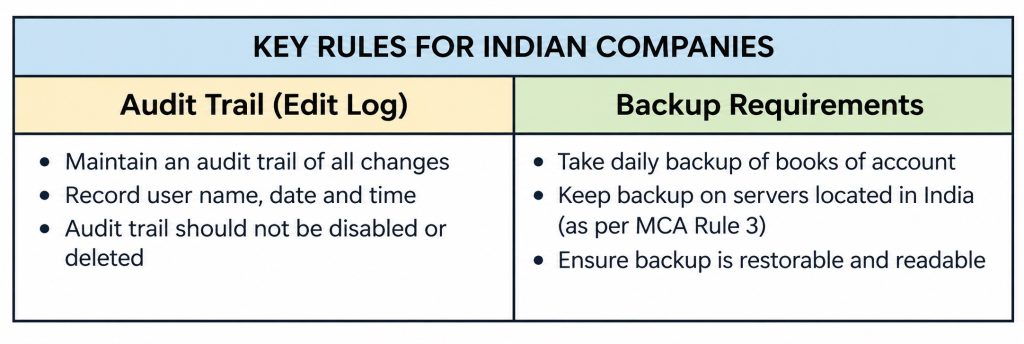
Consultant's Compliance Tip: While LLPs, partnership firms, and sole proprietorships are legally exempt from the MCA audit trail mandate, I strongly advise all business entities to adopt audit-trail-enabled software. Maintaining an unalterable edit log instills internal financial discipline and ensures you are fully prepared if you ever convert into a private limited company.
4. Who controls user permissions and identity access?
In my experience setting up finance teams, I often see growing companies give everyone full master access out of convenience. That is a massive operational risk. Your cloud setup must enforce the principle of least privilege through role-based access control. System administrators must have the granular ability to restrict user roles so that data entry clerks, branch inventory managers, and external auditors only access the specific ledgers and reporting tools required for their job functions.
5. Will the system scale seamlessly as you add users or locations?
Over the years, I’ve seen many growing businesses hit a wall when expanding from 2 voucher entry clerks at one office to 20 concurrent users across 5 regional branches posting daily sales bills simultaneously. You must verify that the cloud infrastructure can handle expanding database sizes, high transaction volumes, and simultaneous voucher postings without causing screen lag, database locking, or unexpected license pricing spikes.
6. What level of support and disaster recovery is guaranteed?
When clients ask me about disaster recovery, I tell them to look past vague marketing claims like "fast response times" and demand concrete technical commitments. Review the vendor’s Recovery Point Objectives (RPO) and Recovery Time Objectives (RTO). Ask specifically whether failover testing incurs additional hourly fees, and verify whether the service includes standard virtualization allowances, such as 3 days (720 hours) of free cloud system virtualization per machine annually, so you can recover immediately during a site outage without unexpected costs.
Practical checklist: Questions to ask before choosing a cloud setup
Use this decision matrix when interviewing cloud software vendors:
|
Evaluation Area |
Critical Question to Ask the Vendor |
Ideal Standard / What to Look For |
|
Data Security & Encryption |
How is sensitive financial data encrypted in transit and at rest? |
TLS 1.2+ encryption in transit, AES encryption at rest, and SOC 2 / ISO certified physical data centers. |
|
Audit Trail Compliance |
Does the system maintain an unalterable edit log capturing all changes and timestamps? |
Fully compliant with MCA Rule 3; logs every edit date detail; feature cannot be disabled by users. |
|
Backup & Data Residency |
Where are daily database backups stored, and how long are records retained? |
Automated daily backups stored on servers physically in India; 8-year record retention capability. |
|
User Access Controls |
Can we implement granular role-based security policies for different employees? |
Robust role-based security tools enforcing the principle of least privilege across all user roles. |
|
Network Resilience |
How does the architecture handle connection drops during voucher entry? |
Local session caching, auto-save mechanisms, and packet optimization to prevent data corruption. |
|
Scalability & Costing |
How do resource allocations and pricing tiers change as we scale users or branches? |
Clear, predictable subscription model with effortless multi-user scaling and zero performance lag. |
|
Disaster Recovery |
What are your documented RTO/RPO metrics and emergency support SLAs? |
Defined RTO/RPO targets, automated failover, 720 hours/year free virtualization, and 24/7 support. |
Consultant's red flag alert: 3 cloud vendor warning signs
- Vague Server Locations: Avoid vendors who refuse to disclose the physical address of their primary and backup data centers, or who cannot guarantee data residency within India.
- Undefined Data Exit Terms: Never sign with a vendor who does not offer a written contract guarantee of data portability (allowing you to export your complete database in standard formats within 30 to 90 days upon contract termination).
- Hidden Fees & Uncapped Renewals: Beware of hidden onboarding setup charges, extra fees for basic data recovery, or contracts that lack price escalation caps upon annual renewal.
The smart choice for growing SMBs: TallyPrime cloud access
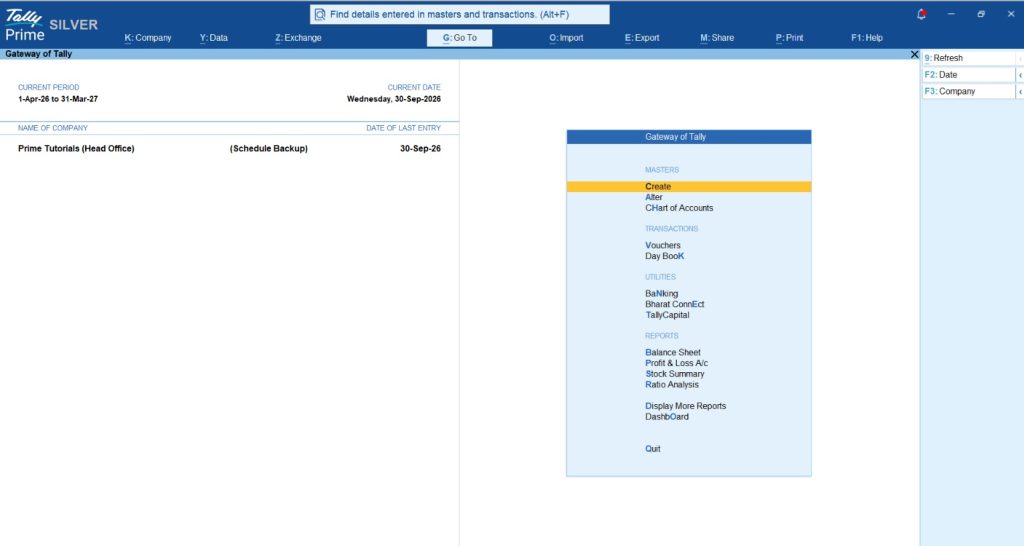
For growing small and medium businesses that require anywhere accessibility without compromising on control, speed, or reliability, TallyPrime Cloud Access stands out as the premier solution. It delivers secure, remote connectivity for multi-location teams and traveling business owners while maintaining the exact operational speed, power, and desktop efficiency that accountants rely on every day.
A major advantage of TallyPrime Cloud Access is that it requires zero retraining for your existing finance staff. Your accountants continue working on the familiar Tally interface they know inside out, while your business gains enterprise-grade cloud flexibility.
TallyPrime Cloud Access guarantees full compliance with statutory Indian regulations. It automatically preserves an unalterable MCA-compliant edit log for every financial transaction, provides the necessary operational details for annual Rule 3(6) ROC reporting, and ensures daily automated backups are stored securely on servers physically located in India.
With enterprise-grade encryption, flexible user role permissions, and robust disaster recovery protections, TallyPrime Cloud Access allows growing companies to scale confidently.
Conclusion & actionable takeaway framework
Moving your financial operations to the cloud is one of the smartest investments you can make in your company's operational continuity and future growth. However, speed and convenience should never replace data security or legal compliance.
Here is a 3-step actionable framework to guide your transition:
- Audit Your Remote Access Needs: Document your current user count, multi-branch workflow bottlenecks, and required concurrent permissions across departments.
- Verify Statutory Compliance & Infrastructure: Ensure any prospective cloud hosting model fully complies with MCA audit trail mandates, Indian data residency laws, annual ROC reporting rules, and 8-year retention rules.
- Transition Safely with TallyPrime Cloud Access: Work alongside expert advisors to implement a secure, high-speed remote accounting workflow that preserves your existing operational familiarity with zero staff retraining.
"Cloud accounting isn't just about accessing your ledger from anywhere, it's about ensuring your business data remains secure, compliant, and uninterrupted no matter what happens."
Frequently Asked Questions (FAQs)
Q1: What is the MCA Audit Trail rule for accounting software?
A: MCA mandates that accounting software maintain an unalterable edit log of every transaction, capturing timestamps, changes, and user details continuously without any option to disable it.
Q2: Are businesses required to keep cloud backups physically in India?
A: Yes, under Indian MCA regulations, daily backups of electronic books of accounts and relevant financial documents must be maintained on servers physically located within India.
Q3: How long must accounting audit trails be preserved?
A: In accordance with Section 128(5) of the Companies Act, companies must retain audit trail records and books of accounts for a minimum period of eight years.
Q4: Why is role-based access control important in cloud accounting?
A: Role-based access enforces the principle of least privilege, restricting user permissions to specific financial tasks, preventing unauthorized ledger alterations, and protecting sensitive business data.
Q5: Can TallyPrime be accessed remotely without losing features?
A: Yes, TallyPrime Cloud Access provides full, secure remote access to all your TallyPrime accounting capabilities from anywhere, anytime, preserving the familiar desktop user experience.
Q6: Does cloud accounting work on slow internet connections?
A: Cloud setups require stable bandwidth, but solutions like TallyPrime Cloud Access optimize packet data transfer, local session caching, and auto-saving to maintain reliable system performance.
Q7: What happens to accounting data during an unexpected outage?
A: Robust cloud setups use automated backups, layered redundancy, and disaster recovery protocols to ensure data integrity, zero data loss, and fast system restoration after disruptions.







