










A working guide for CA firms tired of losing peak-season hours to arrangement instead of judgement.
A CA firm does not lose time because accounts are incomplete.
It loses time because review happens too late.
I saw this clearly during a year-end assignment for a private limited company. On paper, the file looked simple. The client had maintained books in TallyPrime through the year, GST returns were filed on time, bank entries were updated, and the vouchers were mostly complete.
Then the financial statement work started.
The Trial Balance had around 390 ledgers. Debtors and creditors had ageing issues. A few expense ledgers were wrongly grouped. One director loan was sitting quietly under sundry creditors. A GST payable ledger was carrying balances from two years ago. And the team exported data to Excel three times, because the client kept changing entries after every export.
The first draft took almost 17 hours.
Not because the team was slow. The process was slow.
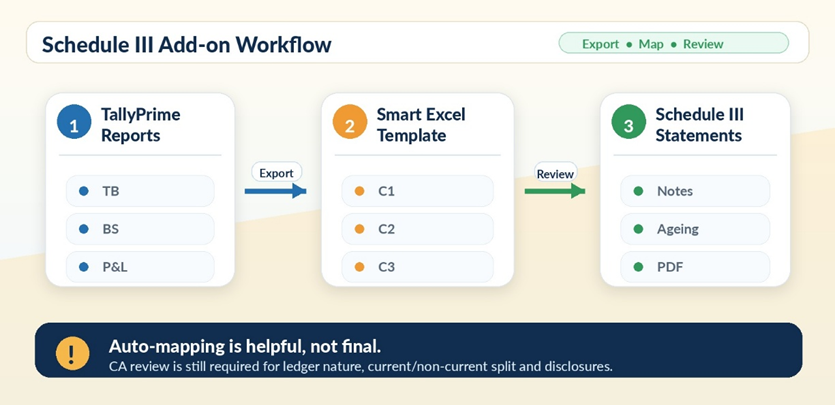
For the next similar client, we changed only one thing, the sequence. Review inside TallyPrime first. Check the Edit Log. Export structured data once. Map with discipline. Build notes from schedules. Lock the books before final drafting.
That file took around 9 hours.
Same type of client. Same team. Better sequence.
This article is about that sequence, and where TallyPrime does the heavy lifting in it.
Speed begins before Excel
Most CA teams jump into Excel too quickly.
I understand why. Excel feels flexible. You can paste, format, link, round off, and build the final statements in your own style.
But Excel should not be your first review tool.
Excel gives you numbers. TallyPrime gives you context. Inside TallyPrime, the accounting trail is still alive: you can move from group to ledger, ledger to voucher, voucher to narration, and into alteration details when something looks odd. The moment you export, that trail goes cold.
So before anything leaves TallyPrime, I spend the first hour inside it: the Trial Balance, Balance Sheet, Profit & Loss A/c, Group Summary, receivables and payables reports, GST and TDS ledgers, cash and bank books, and the Stock Summary wherever inventory is maintained.
That one hour catches the obvious problems. Wrong grouping. Negative cash. Old statutory balances. Suspense entries. Round-figure journals passed suspiciously close to 31 March.
A Trial Balance is not just a report. It is the first warning system.
|
CFO Tip: The Books Readiness Checklist. Before any Schedule III export, get eight confirmations: opening balances match the previous audited financials, banks are reconciled, GST ledgers are reviewed, TDS receivable and payable are reconciled, depreciation is posted, provisions are complete, no suspense balance is unexplained, and the client confirms, in writing, that no more backdated entries are coming. This one page routinely saves 20–30% of review time. |
The Schedule III Add-on changes the starting point
For years, most firms built Schedule III financial statements from a manually exported Trial Balance. This meant the same clerical grind on every file: ledger mapping, current and non-current splits, debtor and creditor ageing, stock details, notes, previous-year comparatives, ratio disclosures, and rounding checks.
TallyPrime's Schedule III (Division I) Add-on changes where that work begins.
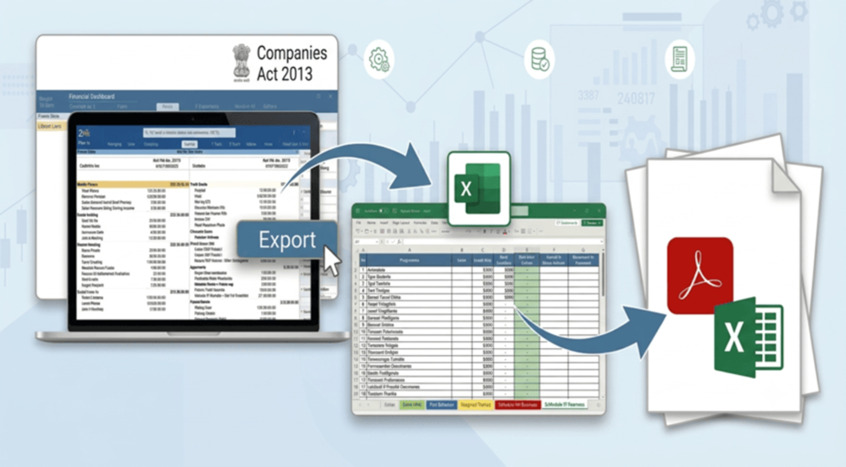
Financial data moves from TallyPrime into a structured Excel template. You can trigger the export directly from the Balance Sheet, Profit & Loss A/c, or Trial Balance. The template receives the data in a structured format, ready for mapping, schedules, and notes.
It is important to be clear about what this does and does not do.
It does not replace professional judgement. The CA still decides whether a ledger belongs under borrowings, trade payables, other financial liabilities, loans, advances, PPE, or other assets.
What it removes is repetitive clerical effort. That distinction matters more than it sounds because, in most firms, a junior spends three hours arranging raw balances before anyone reviews them. That time belongs in review, not arrangement.
Mapping is where the CA earns the fee
Schedule III preparation is not copying a Trial Balance into a prettier format. It is classification.
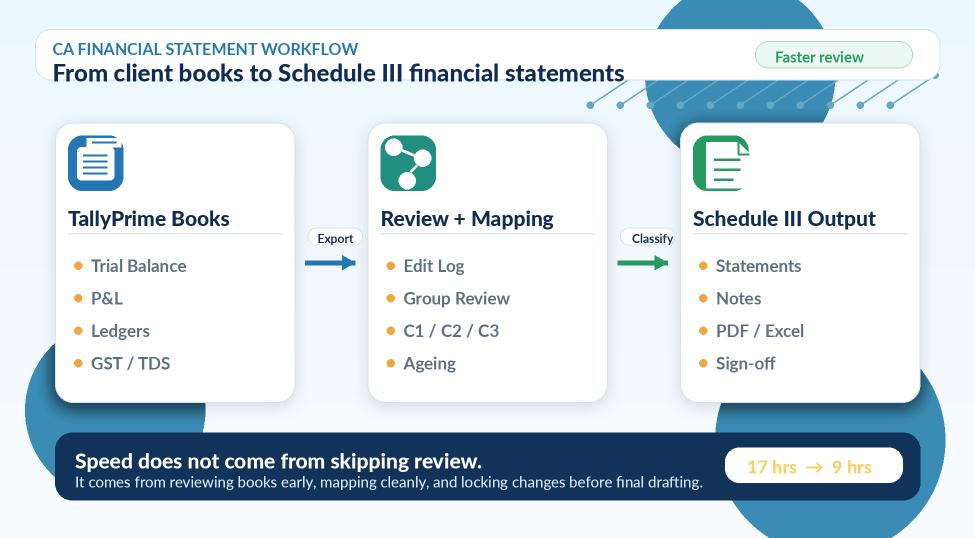
The template works on three mapping layers:
|
Layer |
What it holds |
Example |
|
C1 |
Main financial statement heading |
Financial liabilities |
|
C2 |
Sub-classification |
Borrowings |
|
C3 |
Further breakup feeding the note |
Loan from director |
Auto-mapping fills much of this for you. And here is the caution: auto-mapping is helpful, not final.
If “Loan from Director” sits under sundry creditors, no software will understand the substance. If “Security Deposit” is grouped under loans and advances, it still needs a current or non-current call. If “Advance to Supplier” is parked under deposits, the disclosure changes.
I have made this mistake myself. Early in my career, I trusted ledger grouping more than ledger nature. It earned me an uncomfortable partner review. Since then, my one line to every junior has stayed the same:
Do not map by name. Map by nature.
The areas that always need a CA's eye: borrowings, MSME creditors, related-party balances, security deposits, statutory dues, employee benefit liabilities, and anything with “other” in its name. One wrongly mapped ledger can ripple through four notes.
The current and non-current split cannot be automated blindly
The most common Schedule III mistake I see is not a missing note. It is a wrong current/non-current classification.
Many balances look simple in the Trial Balance, but their disclosure depends on timing, terms, and recoverability. A security deposit for office rent. Current maturities of a term loan. A fixed deposit maturing beyond twelve months. A capital advance for machinery. Retention money receivable.
In the Schedule III workflow, these values need manual bifurcation. That is by design. This is exactly where professional judgement is required. Do not treat every asset as current, and do not treat every liability as payable within a year.
|
CFO Tip: Demand evidence, not opinion. For every current/non-current call, ask for the due date, contract terms, repayment schedule, past collection pattern, and management's stated intention, and check the previous year's treatment. A clean classification saves partner review time and cuts audit qualification risk in the same stroke. |
Edit Log: the problem nobody talks about
Here is the silent killer of CA firm drafts: post-review changes.
You export the Trial Balance. Statements get prepared. Notes get drafted. Then the client “just adjusts” a few entries in TallyPrime.
Sometimes the change is innocent, such as a missed purchase bill, a bank charge, a depreciation correction, or a GST adjustment. But the impact is never innocent. Profit changes. Tax provision changes. Notes change. Ratios change.
One file taught me this permanently. A ₹4.80 lakh journal entry passed after our review disturbed the entire draft. The issue was not just the amount. It was that we could no longer trust our own working file.
TallyPrime's Edit Log fixes the trust problem. It shows created, altered, deleted, and resaved vouchers and masters. Before finalisation, you can therefore check exactly what changed after the Trial Balance export, including ledgers created near year-end, deleted vouchers, high-value journals, backdated entries, and vouchers resaved repeatedly.
It also changes the client conversation. Instead of asking, “Did you change anything?”, which almost always gets a no, you ask:
“Why were these 14 vouchers altered after 18 April?”
Specific questions get honest answers.
Your firm's template is the control layer
Even with the Add-on, keep your own internal working file. Every firm has its own review style, disclosure checklist, and partner notes. The TallyPrime export is the input. Your template is the control layer.
Mine carries the raw export, the mapping sheet, the current/non-current review, debtor and creditor ageing, MSME disclosures, notes to accounts, variance and ratio checks, a pending query list, and a partner sign-off sheet. Boring? Completely. That is the point. Repeatability is what creates speed.
Run the arithmetic once for your own firm. Forty private company files a year, five hours saved per file, is 200 hours. At an internal billing value of ₹1,200 an hour, that is ₹2.40 lakh of professional capacity recovered.
But the bigger saving is not money. It is a team that is not exhausted in peak season. Tired teams make mistakes.
Notes are not decoration
Many teams treat notes to accounts as end-stage formatting. That is where disclosure accidents happen.
Notes explain the numbers, and they usually demand detail that totals do not show. “Legal Expenses” may contain ROC fees, a penalty, a professional fee, and litigation cost, all four of which read differently in a note. “Bank Charges” may be hiding loan processing fees that belong under finance cost.
Small ledgers create big disclosure mistakes.
When ledgers are maintained properly in TallyPrime, the schedules feed the notes almost directly. Bill-wise details support the ageing notes, stock data supports the inventory schedules, and the mapped Trial Balance populates most of the rest, including share capital details, signatory information, and basic disclosures.
|
CFO Tip: The Notes Query Sheet. For each client, tag every note as one of six things: auto-populated, needs ledger breakup, needs management confirmation, needs an agreement copy, needs ageing review, or needs auditor judgement. Juniors get clarity. Partners get faster review comfort. |
The workflow that actually moves faster
A good financial statement workflow should feel like a production line, not a firefight.
Ours now runs in a fixed order. Take the client’s written confirmation that the books are closed. Review the Trial Balance, Balance Sheet, and P&L inside TallyPrime. Check the Edit Log for late changes. Export for Schedule III only once. Review the auto-mapping and complete the unmapped ledgers. Bifurcate balances into current and non-current. Review debtor and creditor ageing. Prepare notes from schedules, not from memory. Run variance and ratio checks. Clear queries with the client. Freeze the books.
The junior does not paste data randomly. The senior does not waste time fixing formatting. The partner reviews judgement areas only.
That is how a firm moves faster. Not by skipping steps, by doing them in the right order.
The point is not speed. It is control.
Financial statement preparation turns stressful when books are not locked, changes are not tracked, and notes are built manually at the last moment. The cost is never just hours. It is late-night reviews, repeated client calls, confused juniors, and avoidable pressure before signing.
TallyPrime helps because it connects the entire chain, from books and reports to the audit trail, export, mapping, notes, and final statements, into one structured flow. It does not replace the CA. It shifts the CA’s time from arrangement to judgement.
A fast file without control is dangerous. A controlled file becomes fast on its own.
The fastest CA is not the one who types faster.
The fastest CA is the one who reviews smarter.







