










Introduction: Why does speed suddenly disappear?
In my 20 years as an accounting systems consultant across manufacturing, pharmacy, and e-commerce, I’ve witnessed a recurring tragedy: success breaking the very systems that created it. I’ve walked into big manufacturing plants where the "Negative Inventory" on screen was a fiction caused by slow data syncs, and retail floors where staff abandoned barcode scanners for clipboards because the software couldn't keep up with the pace of the queue.
This is the Scalability Paradox. The tools that helped you grow become "anchors" for a maturing enterprise. When your system hits what I call the Technical Ceiling, it doesn't just slow down; it "tires" out. Whether you can handle high volume depends on whether your software is architected for sustained throughput or just lab-result bursts.
How do we measure performance? Our testing methodology
To provide objective benchmarks, we use four "Sizing Tiers." Our methodology uses simulated real-world stress tests including automated multi-item invoicing and batch ledger postings to see exactly when a system starts to struggle.
| Sizing dimension | Tier I: Small business | Tier II: Mid-market | Tier III: Enterprise | Tier IV: High-volume |
|---|---|---|---|---|
| Annual voucher volume | 10,000 | 10,000 - 50,000 | 50,000 - 200,000 | > 200,000 |
| Active ledger masters | 500 | 500 - 2,500 | 2,500 - 10,000 | > 10,000 |
| Inventory SKUs | 1,000 | 1,000 - 5,000 | 5,000 - 20,000 | > 20,000 |
| Recommended hardware | i3, 8GB RAM, SSD | i5, 16GB RAM, SSD | i7, 32GB RAM, NVMe | Xeon, 64GB+, NVMe RAID |
What happens to entry speed as you scale?
Standard relational databases (SQL-based) eventually suffer from index fragmentation and write-ahead logging overhead. TallyPrime circumvents this using an Object-Oriented Database Management System (OODBMS).
Instead of SQL engine parsing, TallyPrime uses direct binary serialization. It writes transactions into logical files, specifically .1800 files. To keep speeds consistent, the system utilizes Embedded Indexing and Self-Balancing Trees. By constructing permanent physical hyperlinks directly on the disk, TallyPrime avoids the "seek latencies" that plague fragmented databases.
Avg. invoice save latency: HDD vs. SSD
| Performance tier | HDD latency (Seconds) | SSD latency (Seconds) |
|---|---|---|
| Tier I (10k Vouchers) | 0.25s | 0.05s |
| Tier II (50k Vouchers) | 0.85s | 0.15s |
| Tier III (200k Vouchers) | 2.40s | 0.38s |
| Tier IV (500k+ Vouchers) | 5.50s | 0.72s |
Why is report generation getting slower?
Report speed is a function of "Data Isolation." While standard systems perform heavy "full-table scans" that grow slower as the table expands, TallyPrime reads only relevant segmented files (like LST_XXX.dat).
Furthermore, TallyPrime uses a RangeTree and BitMap structure to handle high-volume reporting without massive CPU recalculations. By mapping identifiers into 500-byte Leaf Blocks, the system marks "stale" vouchers without needing to rewrite the entire database when a master ledger is altered. This localized update mechanism is what keeps your Trial Balance fast even at Tier IV.
Report generation benchmarks (Trial Balance)
- Tier I: < 1.0 Second
- Tier II: 1.8 Seconds
- Tier III: 4.2 Seconds
- Tier IV: 8.5 Seconds
What breaks first? Identifying degradation and practical fixes
When you reach the Technical Ceiling, usually around the List Limit of 14,500 combined names (customers, vendors, items), you will notice these specific bottlenecks:
- The "Spinning Wheel" (File Bloat): Performance typically dips when company files exceed 200MB–500MB. Regular hygiene, purging inactive cost centers and obsolete masters is a must.
- Network Choke Points: Wi-Fi is unsuitable for high-volume accounting. You must enforce a Ping Speed of less than 5ms from client to server.
- Expert Fix: Use wired LAN (Cat 6) and UNC Paths (e.g., \ServerIP\Data) rather than Mapped Drives, which are prone to silent disconnects.
- Antivirus Interference (Error Code 32): Modern Ransomware Protection often locks .tsf files during a save, causing crashes.
- Antivirus Exclusion Checklist:
- Exclude File Extensions: .1800, .900, .tsf, .dat
- Exclude Executables: Tally.exe, Tallyadmin.exe
- Exclude active data directories.
- Antivirus Exclusion Checklist:
Can you maintain integrity and audit trails at scale?
Regulatory requirements (like Section 128) mandate a tamper-proof audit trail. TallyPrime’s Edit Log feature fulfills this by tracking:
- User ID: Identifies who created, altered, or deleted a record.
- Precision Timestamps: Exact date and time of every activity.
- Comparative Logs: Field-by-field "before and after" views.
Expert Note: While the Edit Log increases file size and adds a slight overhead to save operations, it has zero impact on report generation speeds.
When should you split your data?
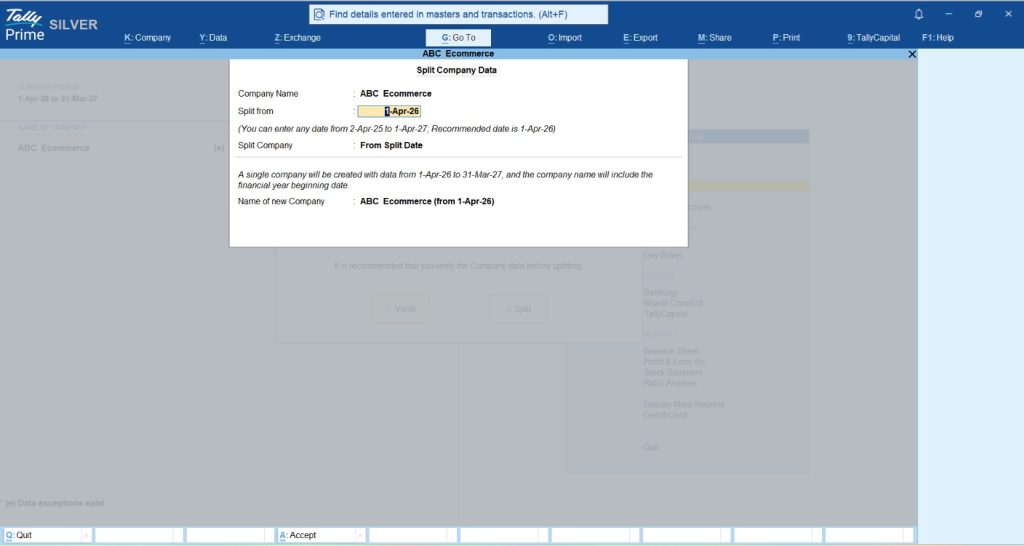
To restore "Day 1" speeds, I recommend using the Data Splitting utility annually. This reduces the active database size by archiving history while carrying forward all balances and masters.
Company split utility duration
| Volume tier | Duration (Minutes) |
|---|---|
| Tier I | 2 min |
| Tier II | 6 min |
| Tier III | 15 min |
| Tier IV | 30 min |
Your capacity planning guide: Scaling your infrastructure
Scaling requires moving from peer-to-peer setups to a centralized architecture like TallyPrime Server (TPS), which parallelizes requests so the server handles the heavy lifting.
- Uniform RAM Requirement: To prevent "Report Lock" (where a slow client stalls others), ensure all machines have consistent RAM capacity.
- RAM Calculation Formula: (500MB [Avg. Per Instance] x Concurrent Instances) + 4GB [OS Overhead] Example: 20 users running 2 instances each = (500MB x 40) + 4GB = 24GB Minimum RAM.
Cloud/VPS sizing recommendations
| Scale | Concurrent users | vCPU | RAM | Storage |
|---|---|---|---|---|
| SMB Team | 2 - 4 | 2 - 4 | 8 - 16 GB | 10 - 20 GB |
| Mid-Market | 8 - 12 | 4 - 8 | 32 GB | 20 - 40 GB |
| Corporate | 16 - 24 | 8 - 16 | 64 - 128 GB | 40 - 50 GB |
Also Read: TallyPrime Cloud Access – Flexible Pricing Plans for Your Business
Conclusion: Actionable tips for a high-performance office
Scaling is a sign of success; don't let your software turn it into a struggle.
- Switch to NVMe SSDs on both servers and client workstations.
- Enforce a Wired LAN with a Ping Speed < 5ms.
- Implement Windows Power Settings: Set to "High Performance" and set hard disk sleep to "Never."
- Audit Your List Limits: Purge obsolete masters once you approach 14,500 names.
- Whitelist Extensions in your antivirus to avoid "Error Code 32."
"In high-volume accounting, the goal isn't just to record the past, it's to keep the system fast enough to manage the future."
Frequently asked questions (FAQs)
Q: Will I lose history if I split my data?
A: No. The utility archives historical transactions into a separate directory, which remains fully accessible for auditing.
Q: Does the Edit Log slow down report generation?
A: No. It only adds a minimal duration to save operations; your Trial Balance and P&L will remain just as fast.
Q: Why use UNC paths over Mapped Drives?
A: Mapped drives are prone to silent disconnects. UNC paths (\ServerIP\Data) provide a stable, physical connection path for high-volume traffic.
Q: Is TallyPrime Server better for my 15-user team?
A: Yes. TPS parallelizes requests and reduces network traffic, preventing the bottlenecks common in peer-to-peer setups.
Q: Does TallyPrime require specific Windows Power Settings?
A: Yes. Set power to "High Performance" and ensure the hard disk sleep timeout is "Never" to prevent CPU throttling and write delays.
Q: How often should I revisit my capacity plan?
A: I recommend a review every 6–12 months to ensure your hardware stays ahead of your transaction growth.







