



- Definition of sales order
- Components of sales order
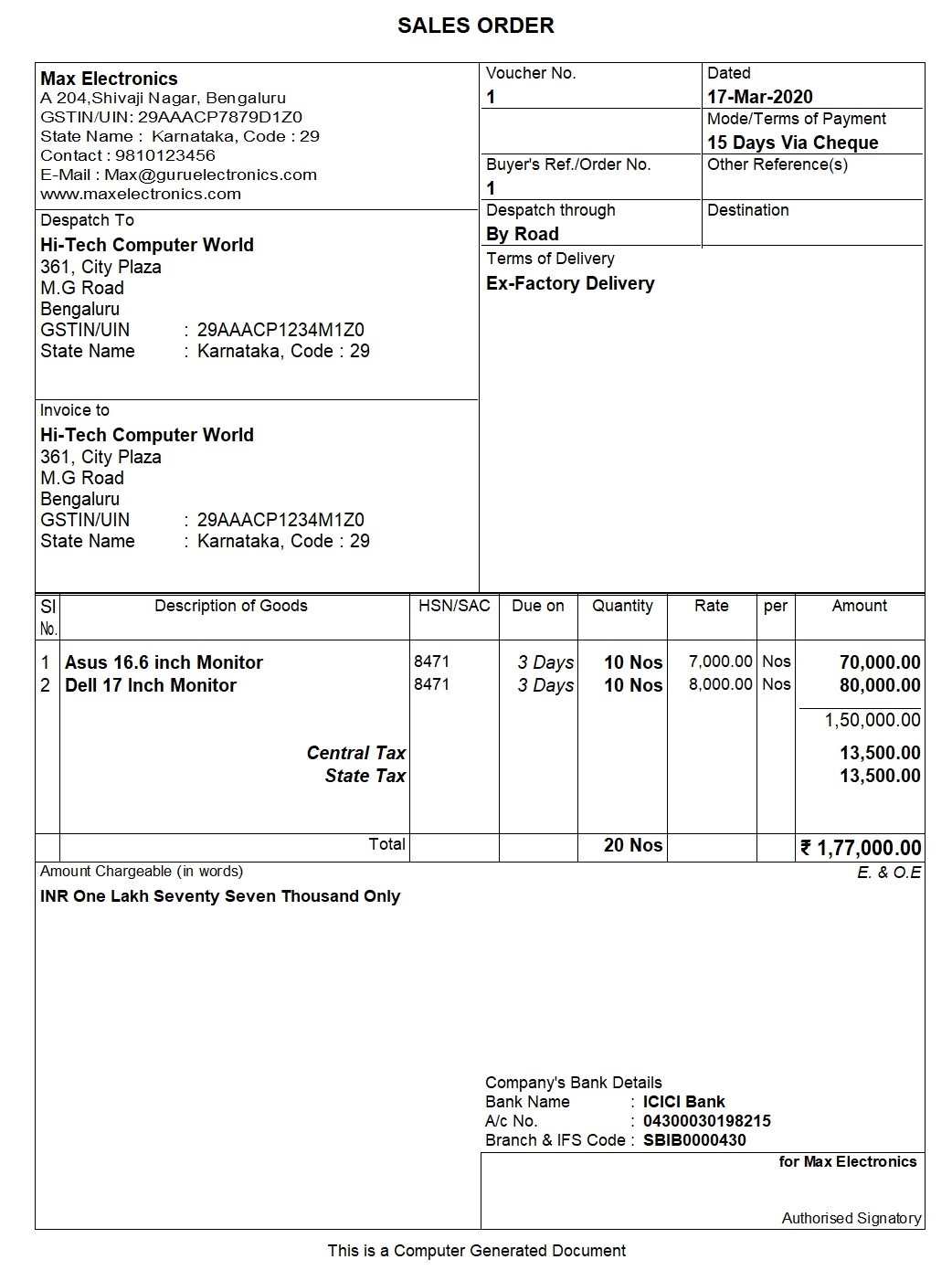
- Sales order sample format
- Sales order process and procedure
- Automating sales order process
What is sales order?
A sales order is a seller‑generated document that records the details of products or services a customer has agreed to purchase, including quantities, prices, taxes, delivery terms, and payment conditions.
It serves as a binding agreement between buyer and seller before the actual invoice is issued.
Components of sales order
A sale order usually carries information such as customer’s name, shipping address, transaction date, products ordered, descriptions, units of measure, quantities, prices, taxes, etc. The key details of the sales order are listed below:
- Name and contact information of the company (seller)
- Name and contact information of the customer
- Customer billing information
- Customer shipping information
- Information about product or service
- Price before taxes
- Tax, delivery, and shipping charges
- Total price after taxes
- Terms and conditions
- Signature
- Any other relevant information as needed
Typical Sales Order Template (Table Format)
| Field | Description |
|---|---|
| Sales Order No. | Unique identifier generated by the system |
| Date | Order creation date |
| Customer Details | Name, address, contact |
| Item Details | Product name, SKU, quantity, unit price |
| Taxes | Applicable GST/VAT rates |
| Total Amount | Subtotal + taxes + shipping |
| Delivery Terms | Expected delivery date, method |
| Terms & Conditions | Payment terms, return policy |
Sales order sample format
Sales order process and procedure
The step-by-step sales order process is explained below:
- The buyer sends a request for a quote from a vendor.
- After receiving the request, the vendor sends back the quote.
- The customer considers the quote reasonable and sends a purchase order.
- The vendor receives the purchase order (PO) and generates a sales order using the details of PO.
- The vendor sends the sales order to the customer to confirm the terms of the sale.
- The vendor assembles and prepares for delivery of goods and services requested.
- The vendor delivers those goods or services as per the order.
- Using the details of the sales order, the vendor generates the invoice and sends it to the customer.
- The customer pays the amount specified on the invoice within the allotted time frame.
Automating sales order process
Sales orders play a central role in making sure a sale is well-documented, properly conducted, and reflective of what both sides are expecting.
When the order is received from a customer for goods to be supplied, the Items, quantities, date of delivery, etc., details are given with sales order number. Later when these goods are delivered, this sales order is tracked for the order details either in the delivery challan or in the sales invoice.
Automating the sales order process using accounting software has helped businesses to track the complete journey right from receiving order till it is fulfilled.
Since the order details recorded in the system and the insights such as pending orders, due dates etc. has helped businesses in fulling customer needs and expectations contributing to better customer experience. Not just that, since the system knows the anticipated inventory outflows based on the order details, help you in optimum inventory management.
Overall, accounting software will give your business a centralized system to manage every area of your business, removing the stress and inefficiency of manual, time-consuming processes.
Sales Order vs Invoice vs Purchase Order – Quick Comparison
| Aspect | Sales Order | Invoice | Purchase Order |
|---|---|---|---|
| Purpose | Record buyer’s intent before delivery | Request payment after delivery | Buyer’s request to vendor for goods |
| Timing | Before goods are shipped | After goods are shipped | Before sales order is created |
| Legal Status | Non‑binding (unless confirmed) | Binding financial document | Binding buyer’s request |
| Key Fields | Qty, price, delivery terms | Qty, price, taxes, total | Qty, price, delivery schedule |














