Pricing
About Us Careers Tally Together Media & News
Select Country

Accounting software

TallyPrime – The Best Accounting Software for Small Businesses in India

One entry. Ledgers, GST, outstandings and financial statements updated automatically.

Record a sale, purchase, receipt or payment once. TallyPrime posts it to the right ledgers, updates what you are owed and what you owe, and keeps your books and GST ready as you go with real time updates.

How a small business actually keeps its books

Eight things every small business does in their books of accounts, and what TallyPrime does about each.

  What you do How TallyPrime is designed to manage it
Everyday entries
Sales, purchases, receipts and payments happen through the day and get recorded in the books.
Create a voucher in TallyPrime and bills receivables and payables are automatically managed while you save your invoice without having to enter invoice details repeatedly.
Daily cashflow
Money moves through a cash box, two or three bank accounts and UPI, and the true balance is rarely on one screen.
Get the status of cash flow and funds flow in a single click. Identify long-pending bills at a glance with ageing analysis. Connected banking to check bank balance right within TallyPrime
Credit
You sell on credit and you buy on credit, so who owes you and who you owe is a daily question.
Bill-by-bill receivables and payables, party-wise ageing that shows how long each bill has been pending, credit limits, and reminders. Set a maximum credit limit for each customer.
Expenses
Rent, salaries, freight, power and a hundred small spends to be recorded to track expenditure.
Expense ledgers grouped the way you think about cost, with cost centres to show what each branch, project or activity consumed.
Stock
A sale is entered into the books of accounts and then separately updated in the inventory records
With every invoice stock is updated, with item-wise profitability, ageing, reorder levels, and batches or godowns for businesses that need them.
GST
With every entry, the GST charged must be calculated and manually updated in GSTR-1
GSTR-1 is auto filled, GSTR-2A and 2B auto-reconciled, and returns can be filed directly from TallyPrime.
Profit tracking
Profit on paper and cash in the bank are two different numbers, and you need both before committing to anything.
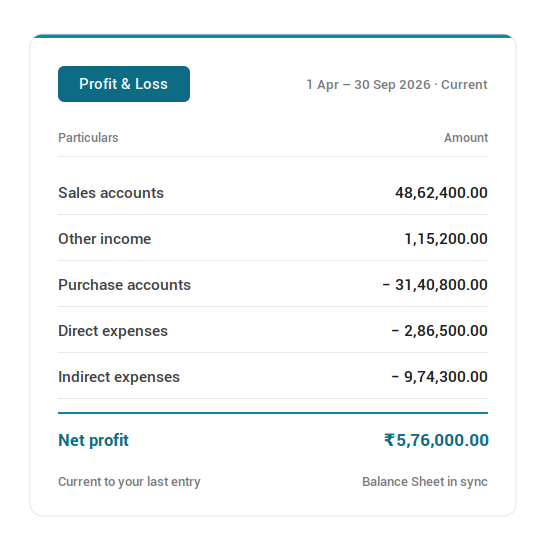
Profit and loss, balance sheet, cash flow and ratios are updated in real time and available for any period, without waiting for the books to close.
The books and your CA
At year-end everything goes to your CA, and each entry has to stand up to a question months after it was made.
Enter a description for every voucher in the narration column as reference for future. Edit log will keep a track of all changes made to each entry. All financial statements as per Schedule III format to ease the workload on your accountant.

Your business and TallyPrime

The six that decide whether the software helps or gets in the way

TallyPrime is built for how a small business actually operates: entries made between everything else, money moving through cash and three bank accounts and customers who pay when they pay.

Everyday entries

A single entry that updates other records simultaneously

Most of your entries are the same handful, repeated: a sale, a purchase, a receipt, a payment, a journal at month-end. They get made between customers, after closing, or on a Saturday, and the longer each one takes, the further behind the books fall. 

TallyPrime gives each transaction its own voucher type, so you pick the type of transaction (whether it be sales or a credit note) and the entry is classified for you. The ledgers, the stock, the outstanding and the tax liability all move from that single entry. Details that repeat like party details, the ledger, the tax rate, etc., are set once and are auto filled.

How your business benefits

With each entry all the relevant books get auto updated giving you real time data

Daily cashflow

Know what you can actually spend today

What is in the bank, what is coming in, and what has to go out; three questions you need answered together, and they sit in three different places. So, the answer ends up being an estimate.  

TallyPrime shows cash flow and funds flow in a single click, for any period you choose, so money in and money out are read against each other rather than separately. Cash flow statement in TallyPrime gives a view of the inflow and outflow of cash during a particular period, such as sales and customer payments. The statement also allows you to able to track positive cash flow and negative cash flow. 

How your business benefits

You commit to a payment knowing what is actually there, and what is actually coming.

Credit

Who owes you, and since when

You have some loyal clients who buys goods from you repeatedly. You extend goods on credit to these buyers often thinking about the amount of business they bring. Sometimes you might lose track of unpaid bills and forget to remind the buyer to pay.  

TallyPrime allows you to record a sale on credit by reflecting the sale amount as Debit against the party in the accounts receivables report. Anytime you receive the payment from your party, you can simply enter a receipt entry for that amount to clear the outstandings for that party. 

If you want to see all your pending bills then the Pending Bills Receivables Summary in displays the details of the receivables from all parties. It displays the pending amount from each party and the total number of bills for which the amounts are pending. 

How your business benefits

Collection becomes a list you work through, not a thing you try to remember.

Costs and profits

Know which part of the business is actually making the money

The profit and loss statement tells you the money the business made or the loss it incurred as a whole. It does not tell you that the second branch has not turned profits, that one salesman’s travel costs more than the orders he brings in, or that a project that was profitable in the beginning stopped gains halfway through. 

TallyPrime lets you allocate income and expense to cost centres — a department, a branch, a project, an employee, a scheme, whatever the business is actually divided into. The allocation happens in the transaction itself, so no separate exercise is needed later to work out who spent what.  

Cost categories let you allocate the same expense two ways at once. One travel bill can sit against the employee who incurred it and against the sales scheme it was incurred for. Profit and loss is available for any period, in several formats, and is updated with every entry you pass. 

How your business benefits

You know which part of the business to back, and which to question.

Financial statements

See where the business stands, on any day you ask

Most small businesses find out how the year went several months after it ended. The balance sheet and the profit and loss arrive from the CA as a filing document, at a point where every decision they might have informed has already been taken. 

In TallyPrime the statements are built out of the entries themselves, so they are current to your last voucher. Open the profit and loss for a month, a quarter or a stretch you choose, and set it against the period before it. 

Every figure opens — a number on the profit and loss becomes the ledgers behind it, then the vouchers behind those, so a cost that looks wrong can be traced to the entry that caused it without leaving the report. 

Ratio analysis puts the health of the business on a single screen: what you own against what you owe, cash and stock in hand, and the payment performance of your debtors — the time your customers actually take to pay, rather than what the outstanding balance suggests on any given date. It is the one report that answers how the business is doing, instead of what it did.

How your business benefits

You stop learning how the business did, and start watching how it is doing.

GST

Correct on the bill, so filing is only a review

Every invoice carries GST at a rate, in a format, against an HSN. An error made here stays quiet until the return is prepared, which is the most expensive place to find it and the hardest point to trace it back from. 

TallyPrime generates accurate tax invoices, bills of supply and the other invoice types you need, with e-invoices and e-way bills raised from the invoice you have already made. Returns are prepared from your own data, with any transaction that would cause a problem listed for correction before you file. 

You can upload and file returns to GST portal directly from TallyPrime. GSTR-2A and 2B are downloaded and auto-reconciled against your purchases, so input tax credit that a supplier has not reported is visible while you can still act on it. 

How your business benefits

Filing becomes a review, not a reconstruction.

What do you sell, and how do you get paid for it?

The one real difference between small businesses

Small businesses might be traders, distributors, manufacturers, etc. The right accounting setup differs based on the things you sell.

How your stock is identified Typical trades How it is handled
Goods you buy and sell Traders, distributors, agencies, shops, hardware Accounts payables and receivables tracked with inventory records updated simultaneously for a full view of the purchase-to-sale cycle from order to payment
Services Consultants, agencies, clinics, IT firms, professionals Service ledgers with SAC codes, and billing on completion or milestone, with receivables tracked bill by bill
Both, on the same invoice Workshops, equipment dealers, AMC and spares, interiors, repairs Goods and services on one bill, each line carrying its own HSN or SAC and its own GST rate
What you make or assemble Small manufacturers, fabricators, food processing, job work Bill of materials and the manufacturing journal, raw material and finished goods held separately, with job work in and out
Work delivered against a contract Builders, contractors, event and project businesses A cost centre per project or site, budgets set against it, and billing raised as stages complete

Connected and AI-led

Connected and AI capabilities in TallyPrime

The manual work has been taken out, one job at a time

Data entry and reconciliation that used to be done by hand now happen inside TallyPrime — fast, accurate, and in seconds.

CapabilityWhat it replacesThe new experience in TallyPrime
Connected GSTPortal visits and manual uploadsUploading invoices, reconciling, and filing returns directly from inside TallyPrime
Connected bankingStatement downloads, line-by-line matching, and separate paymentsDownload and auto-reconcile against the bank feed, and pay directly from TallyPrime
Docs by IraTyping purchase invoices in by handScan or upload the document and AI creates the entry for your review, automatically
Bharat ConnectChasing invoices and payments over phone and emailYour vendor sends the invoice straight into TallyPrime, and you approve it to record the entry
e-Invoice and e-way billA second portal and a second loginGenerated instantly from the invoice you have already raised
TallyPrime with WhatsAppPrinting, scanning, and postingShare invoices, orders, and reminders straight from the transaction

Speedy entry, auto computation

What it is like to run the business on it

Two things decide whether accounting software helps or gets in the way: whether the entries stay a small daily task, and whether everyone who needs the numbers can get to them

  • An entry takes seconds, and stays that way

    Pass and entry within seconds. The ledgers, the outstanding, the stock and the tax liability all are updated from that one entry.

  • The repetitive part is pre-set

    Parties, ledgers, tax rates and the details that repeat are configured once and come up on their own. You are entering what changed, not what always applies.

  • You can break off mid-entry without losing it

    A customer calls to ask whether his payment was received while you were entering voucher details. You check, and come back to the voucher where you left it.

  • More than one person can work on it safely

    User roles decide who sees and does what, and the edit log records what was changed, when, and by whom.

  • You can reach your data from anywhere

    Run TallyPrime on the shop PC, or on TallyPrime Cloud Access to open the same data from home, a second shop, or a phone.

  • You can check the numbers as often as you want

    Nobody has to prepare anything for you to look at the profit and loss, the balance sheet, or bill by bill receivables.

Proof

Real businesses, real outcomes

Outcomes reported by businesses running TallyPrime.

70% Faster GST filing
50% Cut in invoice processing time
On tap Financial reports

GST filing time saved by 70%

Explore how Ramson Building Solution cut GST filing time with TallyPrime's connected GST

Invoice processing time slashed by 50%

Read about how Fairpower Age Ltd cut their invoice processing time in half despite 1000+ invoices a month

Real time financial reports saves 40+ hours for GSTP

Learn how Task & Associates saved 40+ hours in report creation for clients with TallyPrime's instant reports.

FAQs

Which accounting software is best for a small business in India?
The right one keeps your entries, GST, outstandings and financial statements in the same place, so nothing has to be reconciled between two systems. TallyPrime is an integrated software that even lets you file GST right from the interface.
Do I need to know accounting to use TallyPrime?
No. You record a sale, a purchase or a payment and the accounting entry is created behind it. Most small business owners make entries and read reports themselves, and involve an accountant or CA for review and filing.
Will TallyPrime still suit my business as it grows?
Yes. The same product runs from one user on one PC to multiple users across locations, and handles more than one company under the same licence. You add users or move to cloud access as needed. Nothing is migrated, and nothing is learned twice.
I keep my records in a spreadsheet. Can I bring that into TallyPrime?
Yes. You can import data from an Excel file in your own format — sales, purchases, payments, party details, tax data or expenses — without rearranging your sheet first. Mapping templates let you match your columns to the corresponding fields in TallyPrime once, so the import is a step rather than a re-entry. The same template can be reused each time you import.

Get started

Get Started with ₹ 750

Buy Now

TallyPrime Silver

₹ 750

+ 18% GST (₹135)

  • Single user edition
  • For Standalone PC
  • Free access to all TSS Features